But what really stings is that Salesforce itself was never breached. The platform worked exactly as designed. Users voluntarily handed over access because nothing in the default configuration stopped them from doing so.
Salesforce has been slowly tightening things up ever since. In September 2025, they restricted access to what are called “uninstalled connected apps”: apps not explicitly installed by a System Administrator, but instead authorized directly by an end user via an OAuth page. No admin involvement required. The attackers exploited this via OAuth 2.0 Device Flow, an auth mechanism designed for devices with limited input capabilities, which made it trivially easy to walk someone through an authorization over the phone. Salesforce blocked Device Flow for uninstalled apps entirely, and new users are now blocked from accessing any uninstalled app until an admin explicitly installs it.
Those were reactive changes, plugging the exact exploit that got people burned. But Salesforce is also making a longer-term, more fundamental shift: moving everything toward OAuth and External Client Apps, and away from the older credential-passing patterns that have always been the weak link.
Now it’s SOAP API’s turn.
What’s Happening
Salesforce has published an official article on the retirement. The short version: the SOAP API login() operation is being retired with the Summer ‘27 release for API versions 31.0 through 64.0. It is already unavailable in API versions 65.0 and higher, and it is disabled by default in newly created orgs.
The login() operation is one of the oldest ways to authenticate with Salesforce. You make a SOAP call, pass a username and password directly in the request body, and get back a session ID. That session ID is then used for subsequent API calls.
It works, it’s pretty simple, and that’s pretty much the problem.
Credentials passed directly over the wire (even over HTTPS) offer no scope limitations, no revocation mechanism tied to a specific integration, and no meaningful audit trail beyond “this user logged in.” When an attacker gets hold of a username and password, they can call login() and have full access indistinguishable from the legitimate application. There is no way to revoke just that session without also locking out the actual user.
Why This Matters for You
If your org is old enough (and most production orgs are), you are almost certainly still running something that uses login(). It might be a custom integration you wrote years ago. It might be a third-party package that has been quietly authenticating this way since it was installed. It might be a CI/CD job that has been running so reliably that nobody has touched it in years.
The thing about authentication code is that it works until it doesn’t. The first sign of a problem will be a complete authentication failure with no graceful fallback.
Summer ‘27 is not tomorrow, but a migration off login() requires identifying every affected integration first, and that turns out to be a surprisingly hard problem.
Finding What Uses login()
Salesforce gives you a few angles to approach this. The quickest starting point is Login History in Setup. Look for entries where:
Login Type is Other Apex API or Partner Product
Login Subtype is SOAP API
That will show you which users these requests are authenticating as. From there, talk to the humans behind those usernames to figure out what application is making the call.
For a more automated approach, the API Total Usage EventLogFile covers the last 24 hours of API events (or 30 days with Event Monitoring). You can pull it with the Salesforce CLI:
sf data query -q “SELECT Id, LogFile, EventType, CreatedDate FROM EventLogFile WHERE EventType IN (‘ApiTotalUsage’)” -o <your-username>
Once you have the log files, look for rows where:
CONNECTED_APP_ID is empty (meaning no connected app or external client app was used, which is a red flag for login() or raw session ID usage)
API_FAMILY is SOAP and API_RESOURCE is login
The CONNECTED_APP_ID being empty doesn’t guarantee SOAP login(). It also covers direct session ID usage. But anything in that category is worth investigating, since it means the integration isn’t using the auth model Salesforce is moving toward.
What to Migrate To
Salesforce wants everything to go through External Client Apps with OAuth. The two flows they recommend:
OAuth Client Credentials Flow: for server-to-server integrations, background jobs, and anything that doesn’t involve a human logging in interactively. The app authenticates with a client ID and client secret (or a certificate), and gets back an access token. No user credentials involved. This is the right choice for most automated integrations.
OAuth Web Server Flow: for user-facing apps where a real human is authenticating. The user gets redirected to Salesforce’s login page, authorizes the app, and is sent back with an authorization code that the server exchanges for a token. Standard OAuth 2.0 dance.
The security improvement over raw login() is concrete: access tokens are scoped to what the connected app allows, they can be revoked independently of the user’s credentials, and they show up with a CONNECTED_APP_ID in the logs, so you can actually track which integration is doing what. With Client Credentials specifically, your integration’s credentials are completely decoupled from any Salesforce user account.
If you’re dealing with a third-party package or tool that still uses login(), the action item is simple but possibly unpleasant: contact the vendor. If they haven’t published a version that uses OAuth by now, push them on it. Summer ‘27 is the deadline, and a vendor who hasn’t started this work is telling you something about how they approach maintenance.
The broader move Salesforce is making is not subtle. Killing Device Flow, restricting uninstalled connected apps, disabling login() by default in new orgs, retiring it entirely: these are all pieces of the same shift. The 2025 attacks weren’t technically sophisticated, but they didn’t need to be, because the platform’s default configuration made them possible. Salesforce is systematically making the insecure option harder to choose.
That’s the right call, even if the migration work it creates is genuinely inconvenient. An API that passes credentials directly in the request body has no place in a modern integration architecture. Summer ‘27 is enough runway to do this properly, but probably not enough to justify putting it off.
Feature Toggling and the Null Object Pattern
Feature toggles allow us to do a lot of good things, like have continuous integration to be able to merge into development or main without needing to finish the development of a feature (i.e. even if the feature is not done, we can ship it as off while we finish), track how much usage our features are getting, quickly turn off changes in case the new feature has introduced regression issues, etc.
Now, the one thing about feature toggles is that they kind of force us to use a bunch of different if/else statements and if/else statements are not really ideal.
If you’ve ever had to debug code that has feature toggling logic, you probably know what I’m talking about. The code is pretty ugly, it is very difficult to test, and it’s pretty much impossible to understand what are all of the different things that you have to turn on to be able to have the feature working.
So let’s discuss techniques that we can use to help us out, let’s talk about the nerdiest thing of all: patterns! Specifically I want to talk about the Null Object design pattern and how we can leverage it when introducing features that should be behind toggles.
If you are not familiar with it, the Null Object pattern is pretty much what it sounds, it’s all about introducing objects that decide that the best thing to do is nothing.
The reason they are pretty nifty is because you can call them as if they did something, which means you won’t have all of the branching logic, while at the same time they won’t present any side effects.
Example
So, let’s see some code. Let’s imagine that we are implementing a Wallet feature for Collect (or whichever other product). The requirements are the following:
Accounts will have a Wallet, which will be either a positive or negative monetary amount (or zero), that can be used to store a credit that users can have.some text
The idea is that users can be charged money now which will go into their Wallet, so later, when collecting money, we can charge from that wallet rather than having to use the POS device or introduce their card information again.
On the other hand, for a small fee, we can also lend money to users by allowing them to “charge” the Wallet, and create a Payment linked to the Wallet, rather than linked to a Credit Card. This means the Wallet can go into a negative number, which users can pay later.
The trick is that calculating the Wallet amount won’t be so simple. This amount needs to be calculated from a mix of past purchases and their standing status (i.e. if they owe us a lot of money).
At the same time, our app is super popular so we have a lot of clients that we need to support (🤞), which means we are constantly fixing bugs and making improvements to the app. We want to keep shipping those to our clients regularly, even if the Wallet feature has not been completed.
Implementation
Since our Wallet’s amount will be calculated based on information coming from the Account object, that sounds like a perfect place to track whether the customer has a credit or not for their purchase.
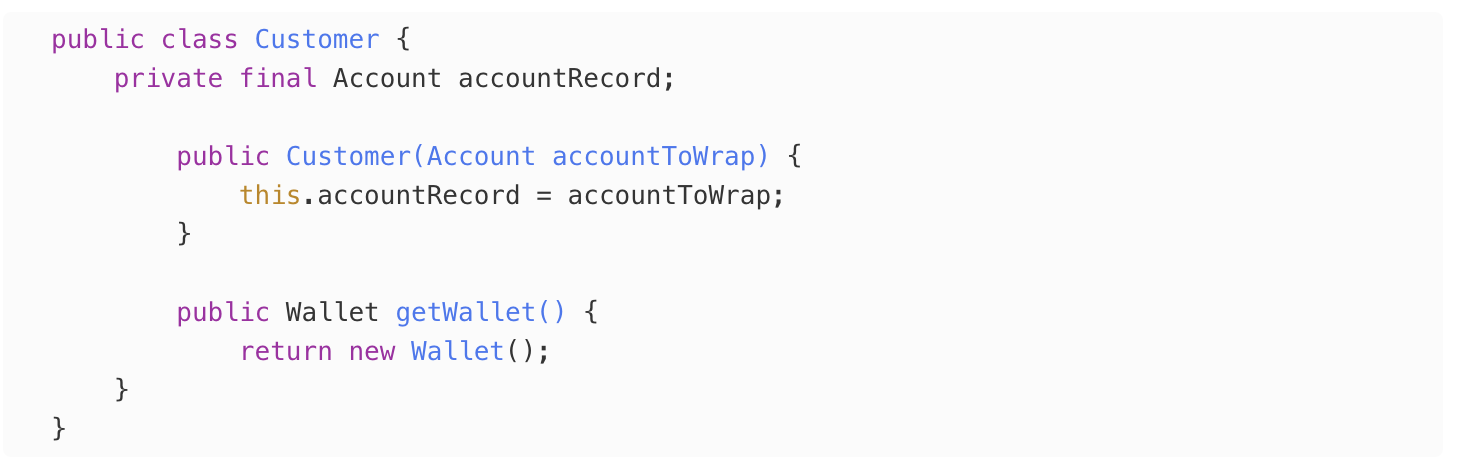
We’ll start by creating a Customer class, which will wrap an Account which is where we will be betting the information about the user’s credit and their payment history.
I got ahead of myself and added a getWallet method, which returns a Wallet object, which we don’t have yet, so let’s go ahead and create it:
Easy enough!
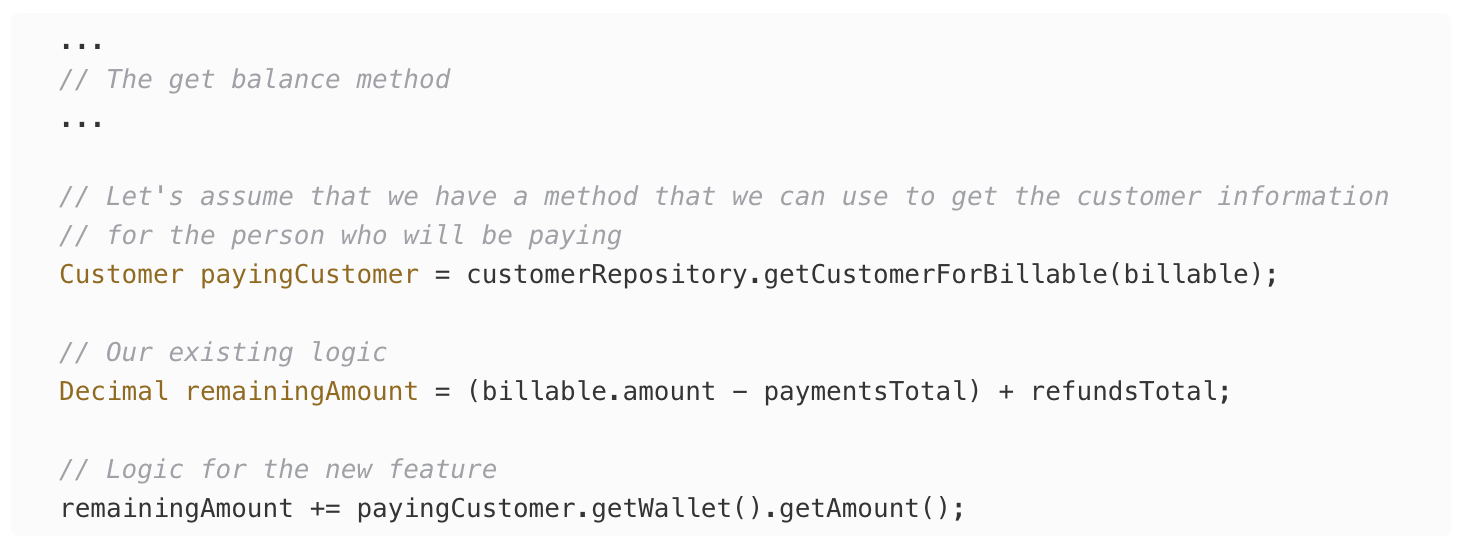
To keep things simple, our stakeholder is asking that when calculating the balance’s remaining amount for a payment, we should simply go ahead and always add the Wallet’s balance to the total. So if they have money in there, it will be credited, if they owe us money, it will be added to the balance.
So with that we can update our balance logic as follows:
Done, ship it!
But, wait a minute, I thought this blog post was all about the Null Object pattern?!?!
Oh, that’s right! We can’t ship this, we have to test this, validate it as a pilot/beta, and make sure it’s up to our standards of quality. Let’s back up.
First of all our Wallet implementation has a giant TODO. We’ve yet to even start with the most complex part of the problem!
So, knowing that it will take quite a while to implement the math for this project, let’s add our Feature Toggle so we can ship the rest of the code safely while we finish the feature.
We’ll start by creating a service to check if the toggle is on or not:
As you can see, I’m assuming that we are setting the toggle using base Salesforce, using Feature Management.
But hey, it’s just a boolean, we could just as easily implement a custom toggling solution ourselves through Custom Metadata.
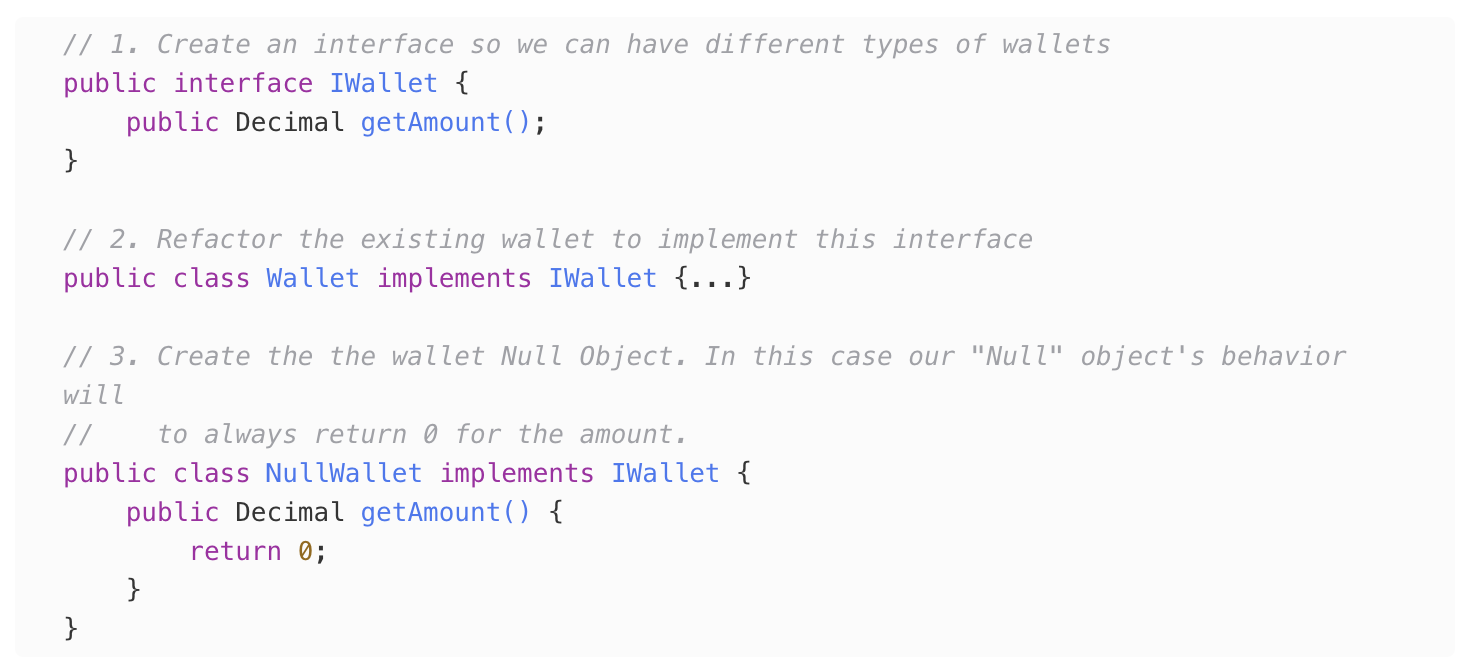
Next thing is buying ourselves some precious, precious time, by being able to turn on or off the wallet feature without introducing regressions while we are working. To achieve this this we’ll create the Null
Object implementation for the Wallet class, for which we’ll need a bit of refactoring. Let’s take it step by step:
At this point we still have one big step to take, which is putting it all together. Right now our Customer class is hardcoded to always use the same IWallet object. We know this is hardcoded because we are using the new keyword in there, which means we have no means of doing dependency injection. To fix this we have to do a bit more of refactoring, for which we’ll use yet another design pattern to move that pesky new somewhere else, the Factory object:
And we will now build Wallets exclusively through the Factory
Now, we are done. We’ll, at least we can ship it.
The point is to be able avoid any kind of branching code (if/else statements, switch cases) as much as possible. We implement the functionality as if the Wallet feature is always on, which makes the code where we calculate the balance pretty simple.
We also keep our responsibilities in check (SRP is the 🐐 of the SOLID principles). It is not the responsibility of the balance calculator to know if that feature is on or not, so it should never have any kind of Feature Enablement logic in it! Nevertheless, that class will now respect the toggle even if it doesn’t know it, because when it is off the Wallet will always act as if the account has no money, just like it used to before this feature even existed.
Of course, this pattern won’t solve all toggling problems. For instance, we (might) still have to make sure that things are correctly displayed/hidden in the UI. But this can at least help with the main domain logic, where the riskier part of the application lives.
We all know that Apex is the most powerful tool we have to customize and extend Salesforce and, even though I find myself frustrated with the slow speed in which the language evolves compared to modern languages, I still find myself often being impressed by the fact that Salesforce allows us to do some of the things we can do with Apex.
But with all of its power, Apex does have its quirks. Writing and maintaining a programming language is hard, and the Apex team has the tough task of also wanting to maintain backwards compatibility for a very long time (maybe forever). This means that sometimes Apex is going to behave…weirdly.
While Apex is definitely not even remotely close to being as weird as Javascript, it does have its examples of weirdness. Here’s one way I have found myself saying WTF Apex! (Wow, That’s Freaky Apex!).
The Null That’s Not Null
A few years ago the Safe Navigator Operator (?.) came to Apex. This now allows us to safely reference methods and properties of an object that might be null.
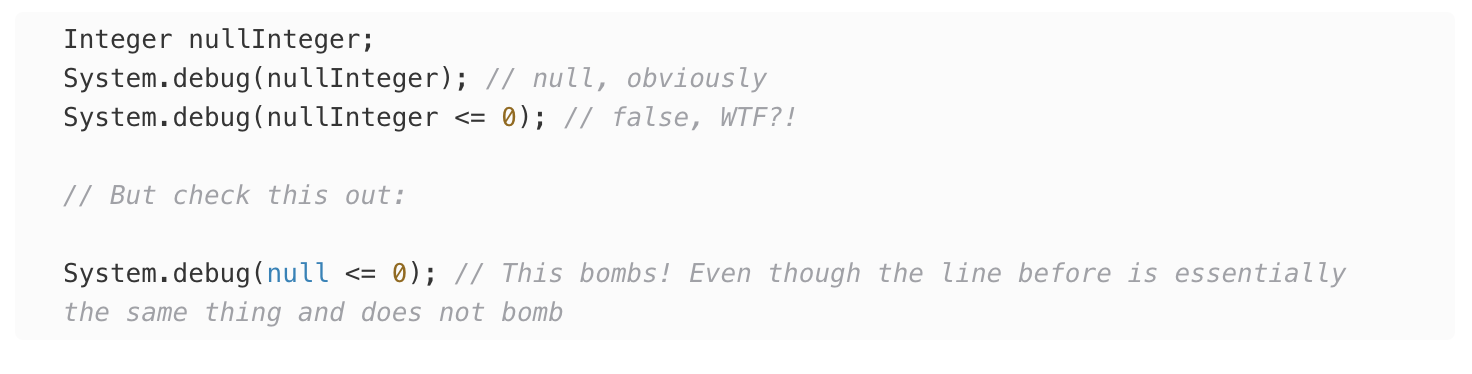
At the same time Apex, like any programming language in the world, also allows us to do comparisons between numbers, so we can do something like:
And if you do this, you’ll obviously get an exception:
So what happens when you combine the two concept? A WTF!
Now, I don’t want to blame the Safe Navigator Operator too much, let’s check out another iteration of the same concept, and getting some more freaky stuff through different means
***
NERD ALERT, do not read below this point, you have been warned ⚠️
I think I know what the issue is behind the scenes, but that requires me to talk a little bit about programming language theory. The issue is that I am declaring the variable as an Integer , if I declare the variable as anything else then Apex throws a compilation error, as expected.
When a piece of code gets interpreted by a language compiler, there are 2 passes that occur (there are more, but this is a gross oversimplification): compilation and runtime. Compilation is when the compiler tries to figure out what the text (the code) means, and runtime occurs when the code is actually running.
What seems to be happening is that the Apex compiler only has a compile time check to see if the comparison operations (==, >=, <=, etc.) are using matching types, but they didn’t any any runtime checks. So, because I am declaring the variable as an Integer , the compilation pass does not throw any errors, and it lets the code run, and it seems that the runtime code simply returns false when it doesn’t know what to do.
Why is unit testing a PITA (Pain In The Abs)?
A few of us enjoy the process of writing unit tests. It feels great having a safety net that verifies that your production code is working as expected, or that the changes you just made to pre-existing code didn’t introduce any regressions. Even better if those tests are quick, and you can rerun them again and again to keep getting that dopamine hit whenever you see that green bar that indicates that everything is all right.
But for most of us the prospect of writing tests is an awful proposition. We dread finishing our work but still not be fully “done” because now we have to spend that unpleasant time writing those vile tests. It feels like a chore, something you know you have to do, but you never want to do.
But why is this the case? It is just writing code after all, and we all love writing code (I hope). So, if we love writing the production code, what makes writing the test code different? Why do we enjoy one so much but hate the other?
Everyone is different so we all have different reasons to dislike doing something. For all I know a unit test bullied you when you were a child and that’s the reason you hate and fear them so much. But there are some reasons that, in my opinion, pretty commonly make people not want to write tests.
Difficult to write
The first of these reasons is that tests can be difficult to write. Difficult can mean several things in this case. It could be that they are actually hard to write because the system under test (the functionality you are writing tests for) is really complex, so you do have to think long and hard about how to test it. Or it could be that they are rather simple but a chore (no much thinking, but a lot of writing and setting things up).
Slow
Another reason why I think people don’t like tests too much is that, without actively paying attention to how long they are taking, they tend to become slow, and slow things, specially when we are talking about computers, are definitely not fun to deal with.
They Feel pointless
And finally, but probably most importantly, writing unit tests can feel pointless for a lot of us. Why write a unit test if I just tested the real system myself and verified that everything is working fine? It definitely feels like a waste of time knowing that something works and having to write a test that verifies what I already know.
Through the rest of this post I want to go through these different reasons and see if there’s anything we can do about making tests not be such a pain to write. But I want to present real, actionable things that you can do while writing tests (and regular production code) to make things easier. Again, we are all different and have our different reasons for liking or disliking something, but even if you never really truly like writing tests, maybe these techniques can help you at least tolerate it.
Let’s start with identifying what makes it difficult to write tests.
I find it better to look at a code example that we can go through so that we can dissect it and line-by-line, identify what might make it difficult to write a test for.
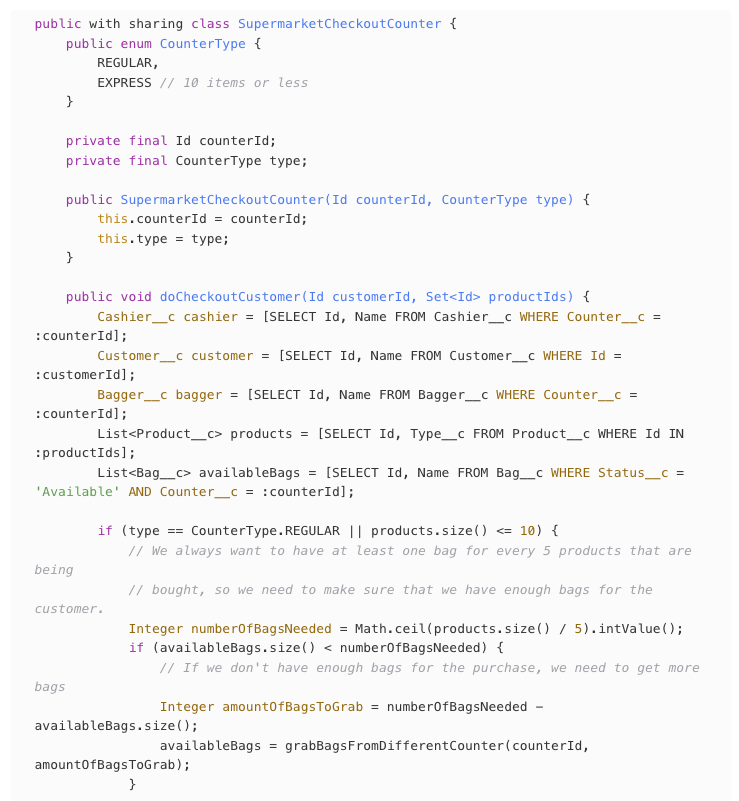
Let’s imagine we are writing a system for a supermarket checkout counter. Our system is in charge only of the things that happen in the counter, namely:
Scanning the items the customer is buying
Processing payment
Bagging the items
Let’s look at the code.
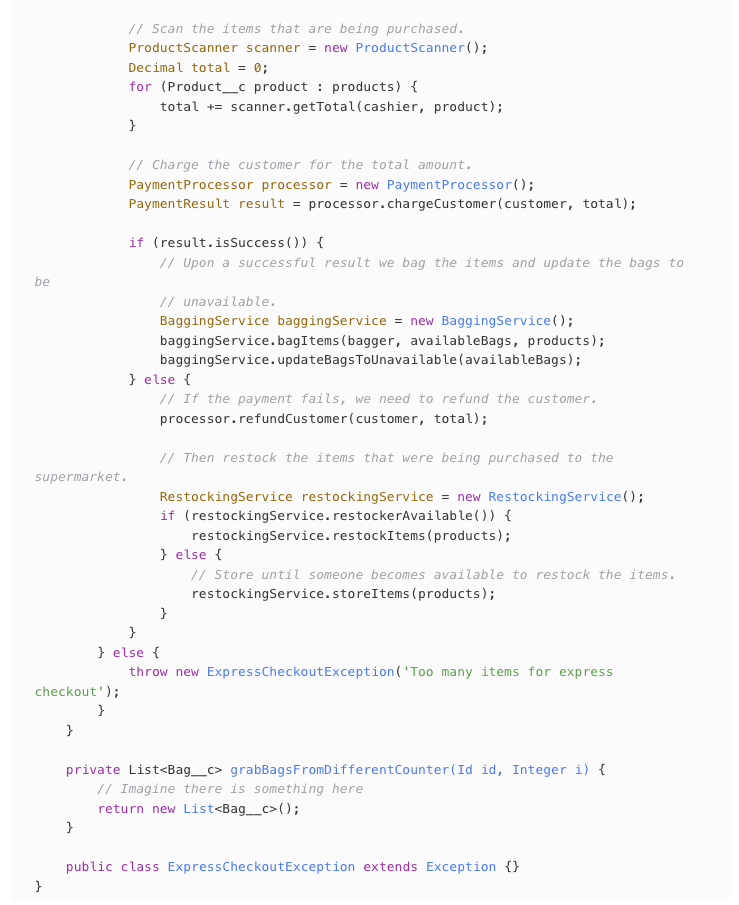
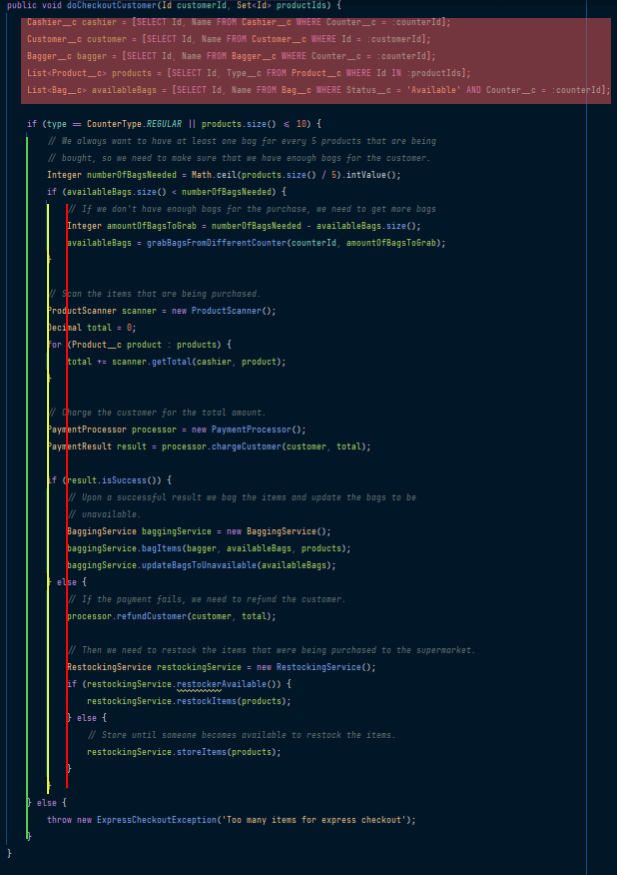
Hopefully everything is clear, but here is a recap of what the code does in plain English:
Receive the information needed to execute (in this case the information are related to record Ids)
Uses the record Ids to query the database for the appropriate records (cashier, customer, bagger, each product, and bags)
Validates the customer is not purchasing more than 10 items if they are in the express lane
Validates that there are enough bags for the purchase for the bagger to use
Scans the products to get the final total to pay
Process payment
Bags the items
Some post validation cleanup in case anything went wrong with the payment
You might be thinking that this code looks great or you might think it is awful. I personally think this code has a few problems, and I almost want to go in there and start refactoring before we begin writing the tests. But that actually takes me to Tip #1: Do not refactor prematurely.
The reason why we don’t want to start refactoring right now is that we are pretty sure this code already works. We wrote it, then we went through the UI and we tested it manually and everything was ok. If we start refactoring right now to make the code easier to test, and then we break the functionality, what’s going to happen is that we will HATE writing tests even more. We will think that writing tests is a liability that causes your perfectly fine little princess working code to break because you have to touch it to make it testable.
The last thing we want is for you to hate testing even more, so right now JUST DO NOTHING to your production code. Leave things alone.
With that in mind let’s get right to it and start writing some tests for this. We want the process of writing tests to be as fun as writing production code (or at least to not be an awful time), so what I’ll do is that anytime that I feel like I’m not having fun, I’ll stop, and see if we can figure out why that is and if there are ways for me to go back to having fun again as soon as possible.
First thing I’ll do is that I’ll create a test class for our functionality, I’ll call it SupermarketCheckoutCounterTest.
So far so good, I’m having fun.
So… where should we start? 🤔🤔🤔. Ok, I’m not having fun anymore. I have no idea what to test first.
The reason I’m not having fun is because at the beginning the problem is too large to tackle. So, Tip #2: Don’t think too much.
Thinking too hard will leave you exhausted at the end of the testing session, so that will just give you the impression that testing is hard. The process should be quick and painless, always making progress towards the end goal by taking very small (and hopefully fun) steps.
But not thinking can also be hard. How can I progress if I cannot think?
The good news here is that the code will tell you what to do. You don’t even need to read the code, just look at the code.
So, let’s take a birds-eye view of the system under test once again (don’t read it, just look)
That red section at the top is pretty much just setting variables and doing some extra queries, but it doesn’t really contain any kind of business logic that we want to test. The meat of what we want to test starts with the if statement, so that’s where we’ll focus our eyes.
From there we see we have different levels of indentation (which are caused by control flow statements, like ifs, fors, whiles, switches, etc. What we need to remember is that the deeper the code, the harder it is to get there. Because our Tip says that we should avoid thinking as much as possible, we’ll start with the shallowest level: the green bar.
Now we know which test to write first: check that an exception is thrown when the customer is on the express lane with more than 10 items.
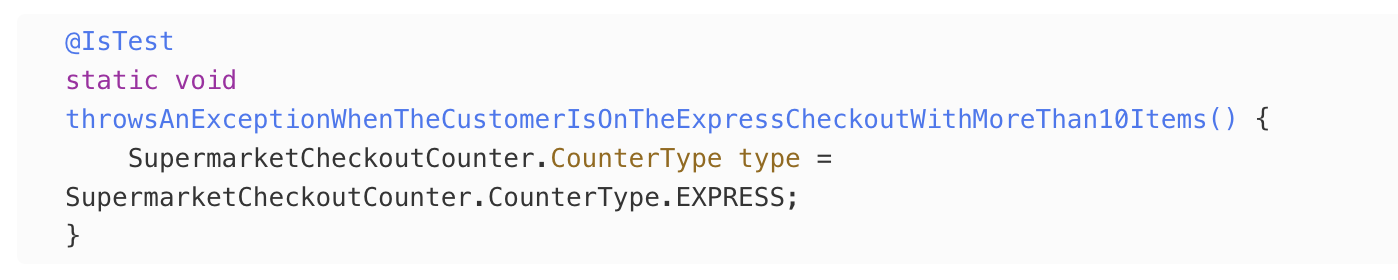
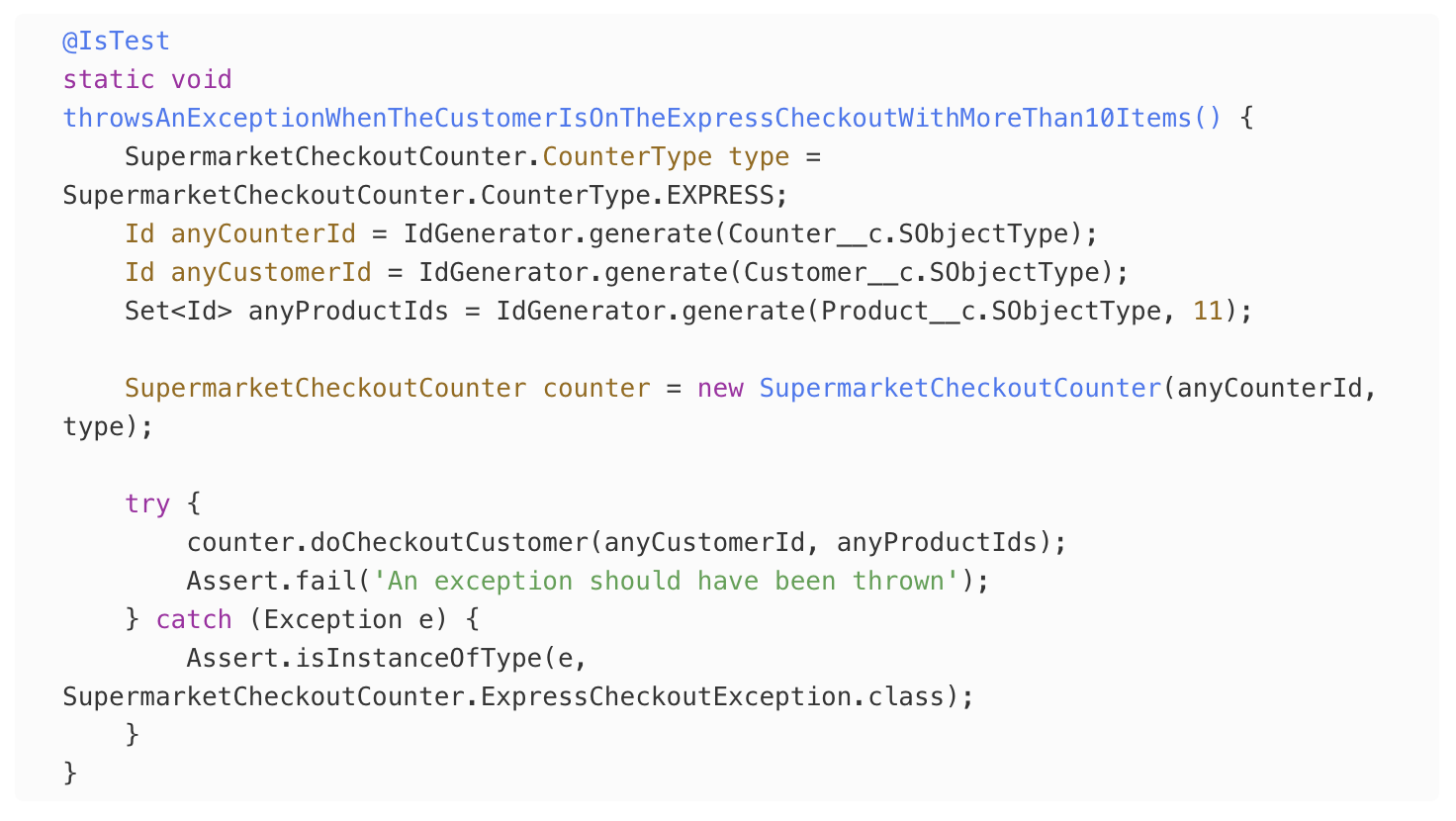
So let’s define that test and start creating the data that we want to pass to the method we are testing.
We know that we want to use the EXPRESS checkout type, so that’s easy.
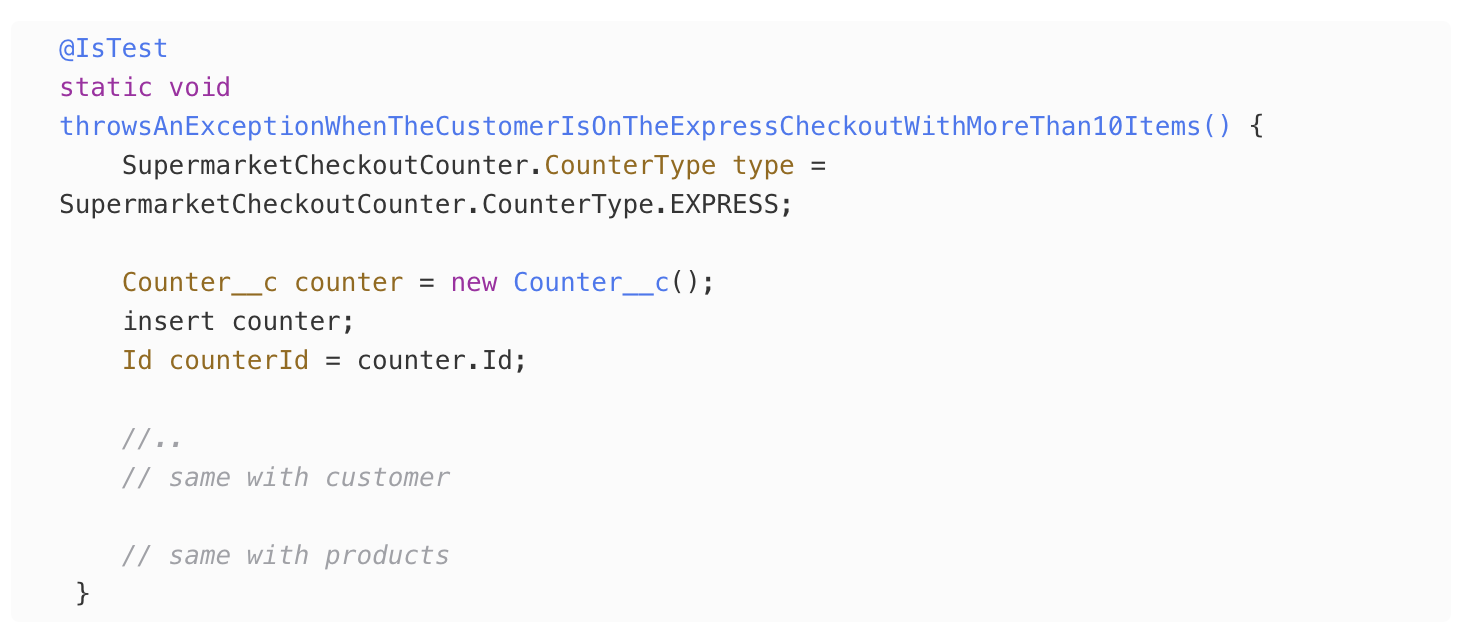
We want a counter Id, so let’s insert one and get the Id, same for the customer, same for products….
I don’t know about you but I’m not having fun anymore…
The moment we started needing to communicate with the database and setting all of that complex stuff up, it just killed all of the momentum we had going.
So let’s stop. And let’s make it fun again. To me something that’s more fun than having to set up a lot of data by hand, is just being able to ask something to set things up for me. That takes me to Tip #3: Automate setup data.
Unit tests are made out of 3 phases, usually called Arrange Act Assert or Given When Then. The “Arrange” part of the tests are 99.9% of the time, in my experience, the less fun thing to write. So this means this is where most of our love needs to go so that we can make it fun.
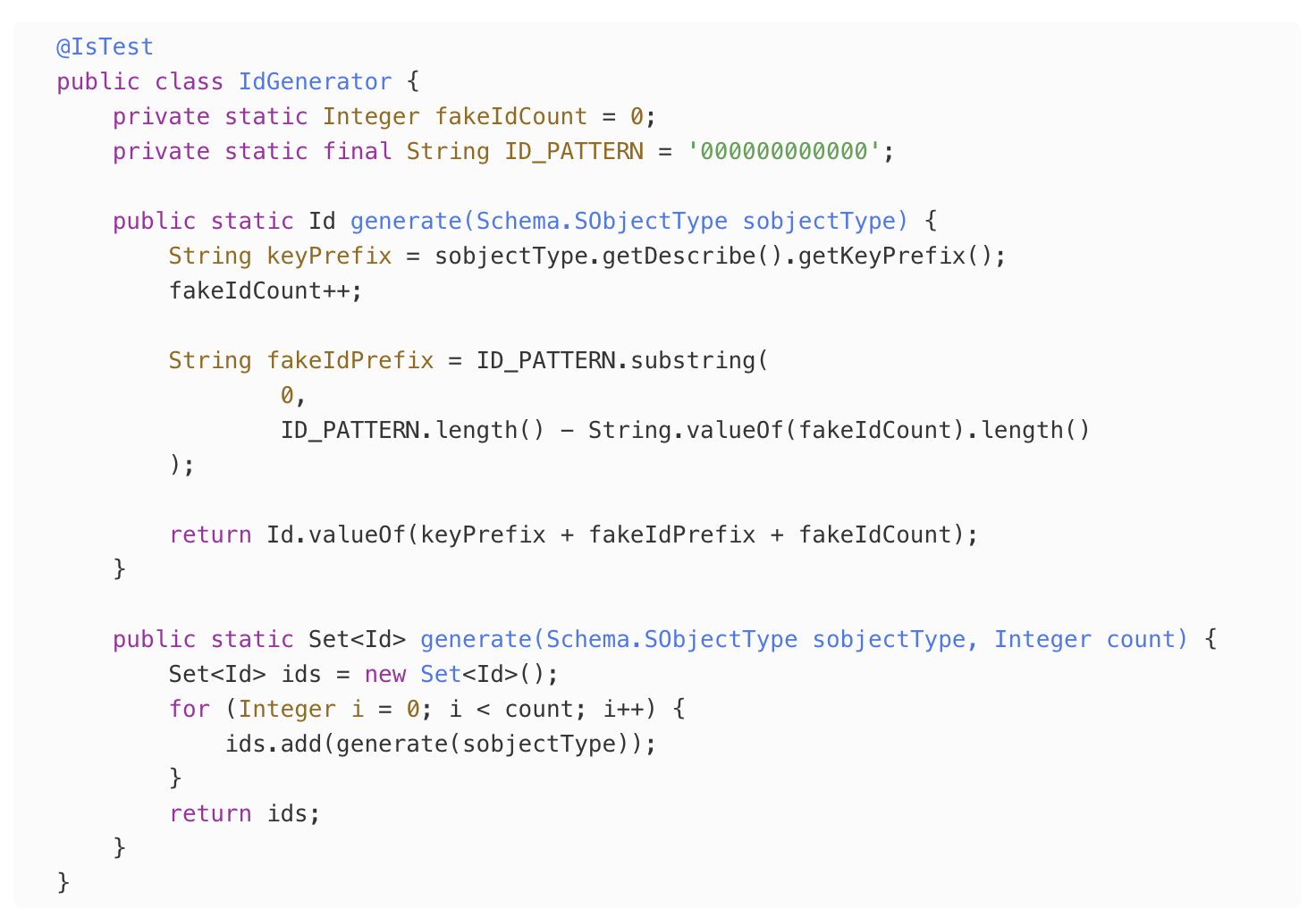
In this case I need a bunch of Ids, so I’ll create an IdGenerator class that I can reuse (kudos to fflib_IdGenerator which is from where I took the original Id generation logic). Note that having to create this class is a little bit painful right now, but that is only because this is a brand new project and I don’t already have this. Now that we have it, imagine how much we can reuse this same helper FOR THE REST OF TIME after just having to spend a little bit of time writing it now.
Whenever I need an Id I don’t need to setup an SObject, insert it into the database, make sure I’m not running into validation rules and triggers, and then extracting the Id out of it. That sounds like a nightmare. Now my test can just do this:
Ok, that to me was kind of fun. We now have a reusable helper that can help us with every single test we write in the future and just had to spend like 2 minutes writing it. But…the test doesn’t pass. Hmm, back to no fun. What’s the issue now?
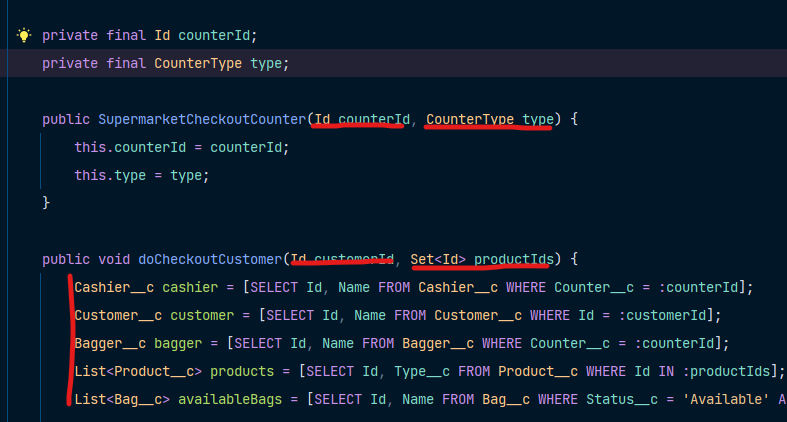
The issue is that there is a pretty big smell in our code. We have too many input parameters. The method we are testing only has 2, which sounds perfectly fine, but that doesn’t paint the whole picture. Let’s look at the code again
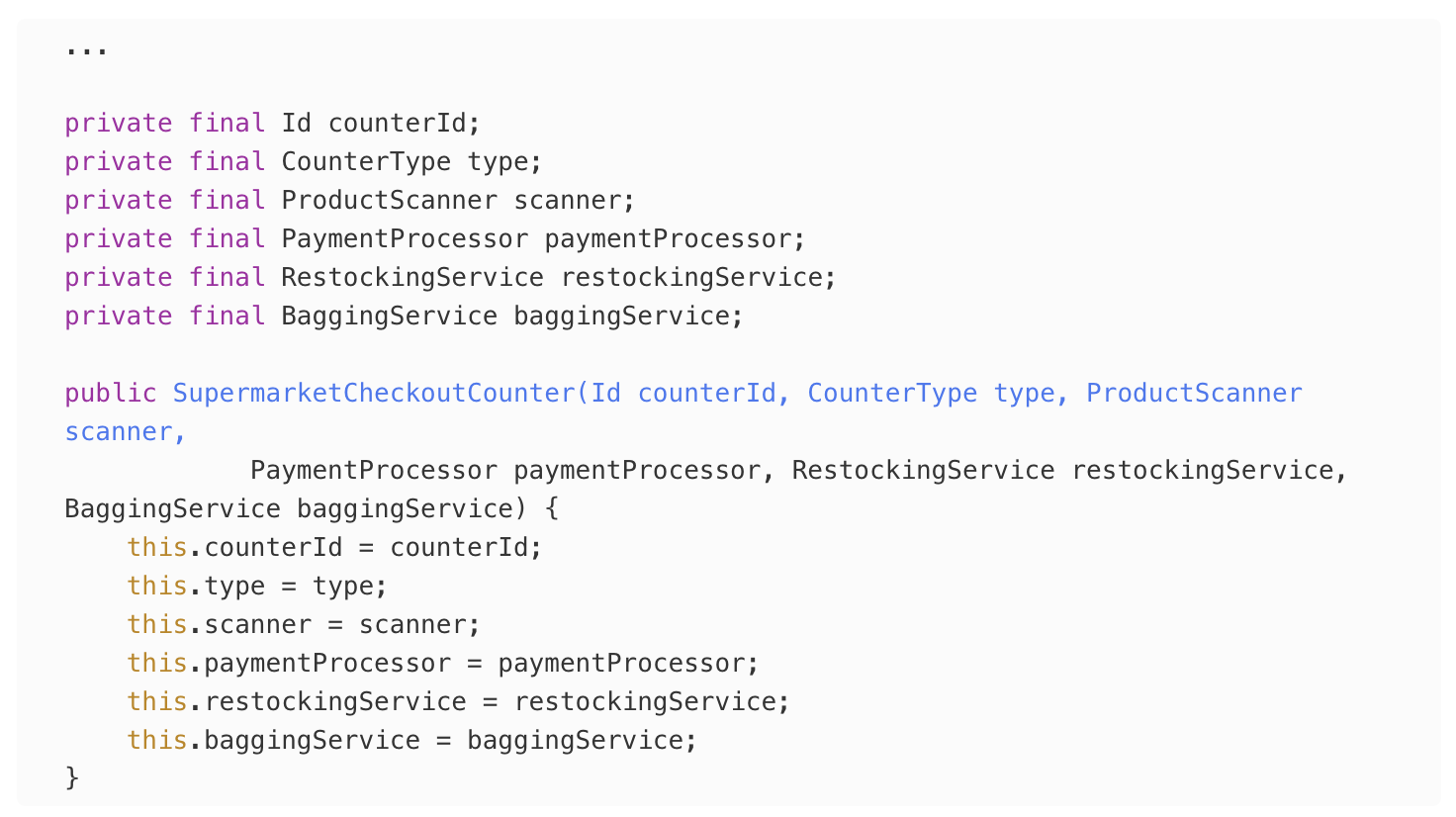
Our code actually has 9 dependencies!!! Yes, there are only 2 input parameters in the method, but then we have 2 more in the constructor, and on top of that we have 5 more implicit dependencies: every query that we are doing to set up our method is essentially an “input” for the rest of our business logic.
We want to have a passing test as soon as possible, and we also want to think as little as possible. To accomplish this we will do a few things that will feel a little bit like cheating, but to get clean we gotta get dirty first, so let’s get dirty. We are going to bend Tip #1, and do some refactoring. But this will be so painless and consequenceless (is that a word, who knows? But you know what I mean) that I’ll say we are still within the spirit of the rule.
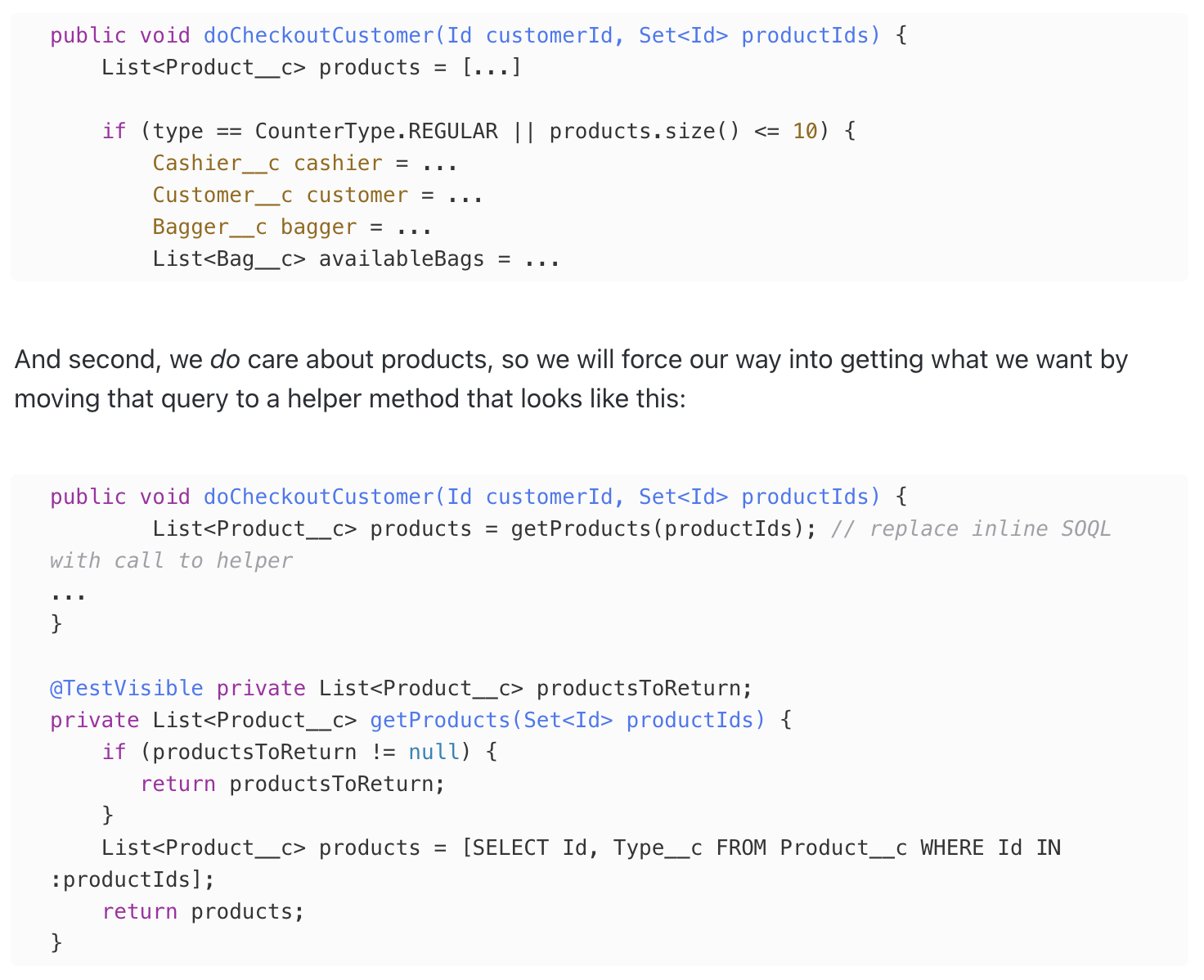
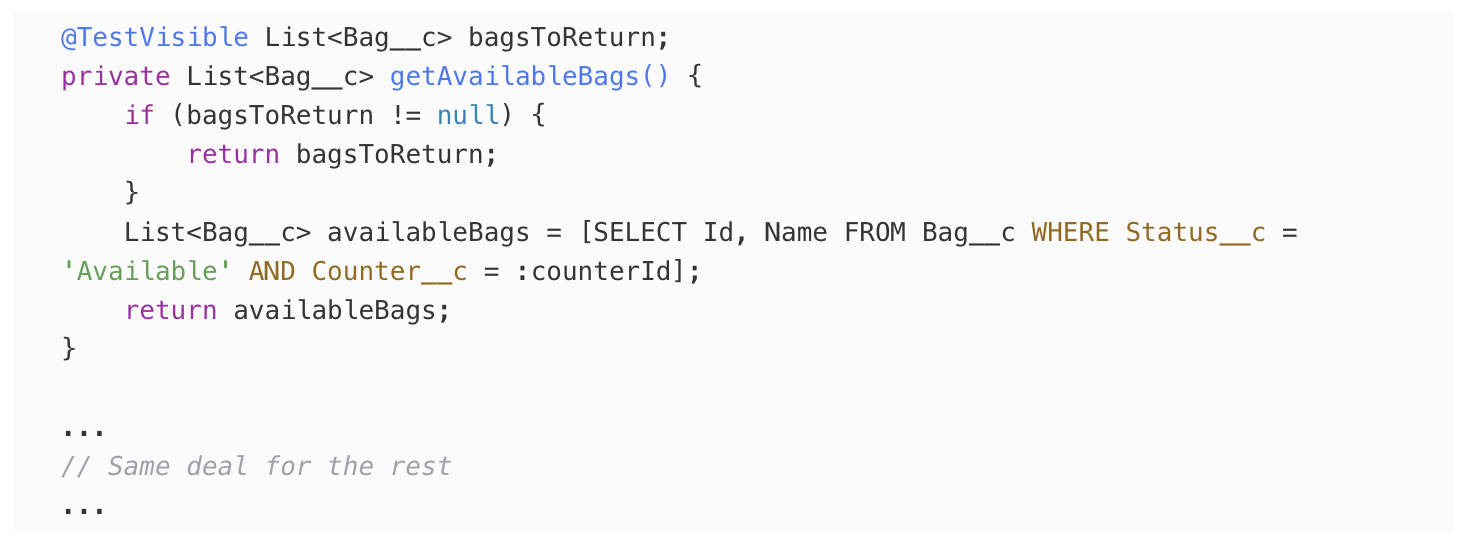
If we look at the code that we are testing, we only care about one of the queries, the one for products. Everything else we don’t care about, so we will move into the if so they are out of our way:
This is called, ladies and gentlemen, a hack. But that’s fine, because this hack just made us realize something important: This query code doesn’t belong to this class. Why is this code painful? Because it is speaking a different language than our system under test. We are testing the logic of going through a supermarket checkout, which is business/domain logic, so why are we speaking query language?!?!?
If we go to our local supermarket right now and ask anybody working there what happens when you checkout, they will tell you: someone scans your items, they charge you money, someone else bags your items. That’s our domain language. That’s what our domain experts understand. No one will mention a database. No one will say “SELECT FROM BLAH BLAH”. If someone said that to me in the supermarket I’d get out of there as fast as I could and call the cops. So why are we doing that in our code? We shouldn’t. We are talking 2 different languages (domain language and SOQL language), that’s confusing.
For now, we will just move the code that speaks a different language (in this case SOQL) out of the way and put it aside in the helper method.
Now that our system under test is ready to be tested again. Now we have deeper knowledge of our domain, which leads me o Tip #4: Treat test code as production code.
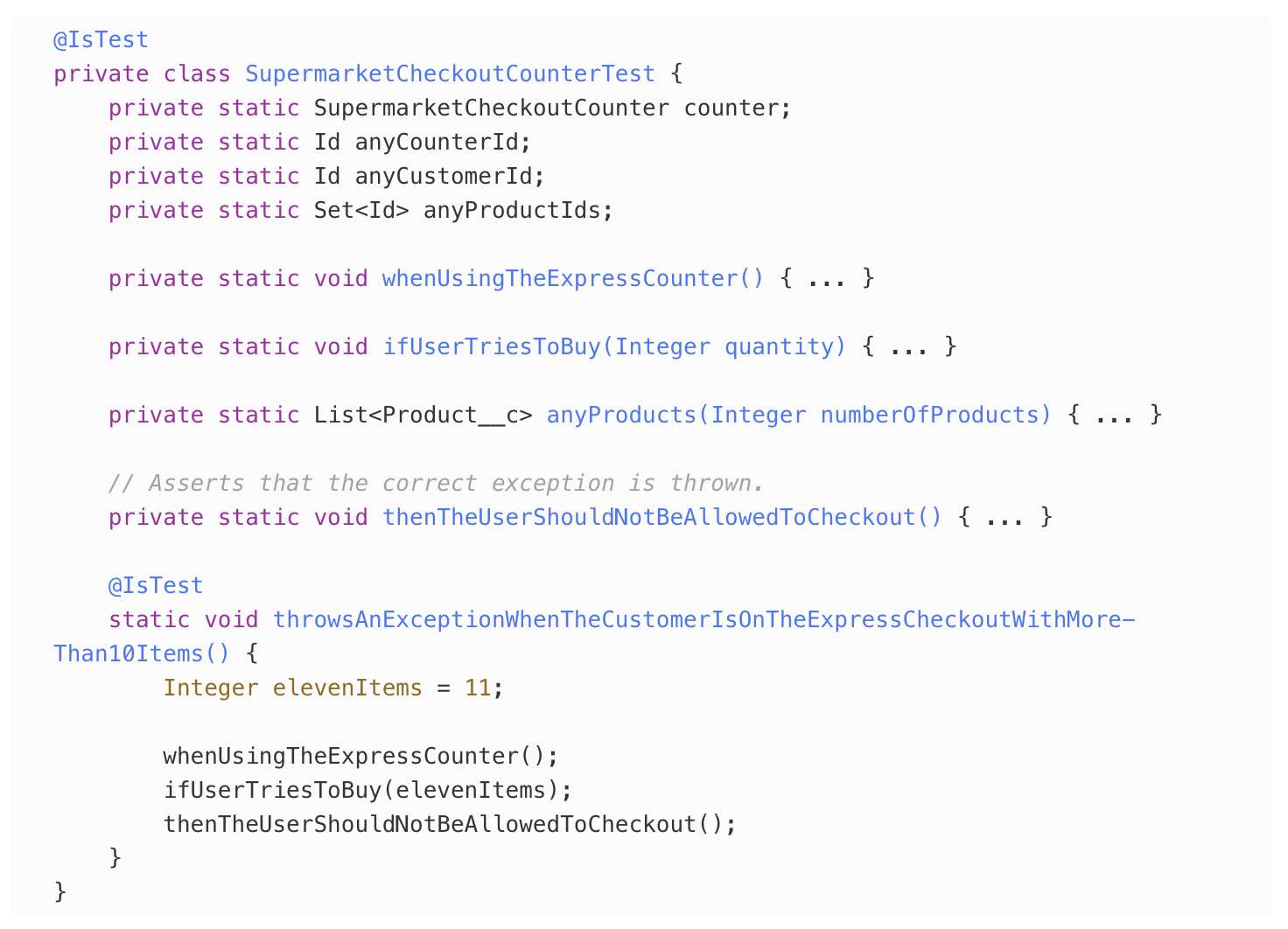
We just learned a lot about our domain, we know what kind of “language” we should speak. No SOQL, no nonsense, speak clearly CHILD! Let’s rewrite our test a little bit and make it speak clearly:
Look at that, isn’t it beautiful? 🥹
I can ask a domain expert (someone working at a supermarket) to read that unit test and I’m fairly certain they’ll understand what it means, and if there’s anything wrong with the way we are expressing the business logic they can let me know.
What we did is that we moved what doesn’t matter out of the way. Anything that will be shared with other test methods, like the Ids to pass, or the SupermarketCheckoutCounter instance, we move it out of the test method. Remember that in Apex tests run in isolation, so we can move everything to the static context and just keep our test clean and Apex will ensure that our tests keep being standalone.
And now we have a passing test!
Ok, we’re rolling, I’m having fun. We let the code tell us what to test next, which takes us to the next indentation, which is yellow. At this point it seems like we can just test the happy path, so let’s do that.
First let’s extract the rest of the SOQLs out, just like we did for the Products query (hackThePlanet):
And let’s write the happy path test, but just checking one thing at a time, because Tip #5 is: test (and assert) one thing at a time.
At this point I can write a single test that asserts that the whole happy path flow works (scan, payment, bagging, etc.), but remember, I don’t want to think. Let’s keep it simple and dumb and just test and assert one thing. This doesn’t mean we want a single ASSERTION, this means we want to ASSERT ONE THING. Those mean different things.
You oughta know the drill by now. We make our test speak our language and move things out of the way. Our test is looking pretty cool and expressive, but we have one problem: what to assert?
In this test I want to check that the payment went through, and to do that I’ll resort to Tip #6: Test UNITS, and Tip #7: Trust that your dependencies are tested. but I have a pretty big NEW problem. That’s Tip #8: Beware the new keyword (see what I did there? that’s called a pun).
At this point tips are coming at you fast, so let’s slow down and go through each. First thing is that we want to UNIT test, this means that we only want to test the single unit under test. We want to assert that payments went through but NOT test the Payment Processor code. To do this we can simply test that the processor code is being correctly invoked when needed. That’s why the next tip, trust, is important. We have to trust that there is some other code out there that is correctly testing the Payment Processor, because are not going to worry about what it does here. Our code is only dealing with checkout, we don’t care about how the payment gets processed, so we don’t worry about it.
But finally we have that “new” issue, which is how our Payment Processor is getting called, and that is because we are using the new keyword:
The reason why this is problematic is because right now our code is tightly coupled with the Payment Processor instance. If one of our test reaches that code, it will try to call it, and if that code needs complex set up (for example, imagine if that code also calls the database) that would NOT be fun. No sir.
So we will fix the problem by avoiding the new keyword altogether, and injecting a fake version of the Payment Processor into our unit under test. We will give it something we control, so that it is nice and fun to set up.
This is a 3 step process:
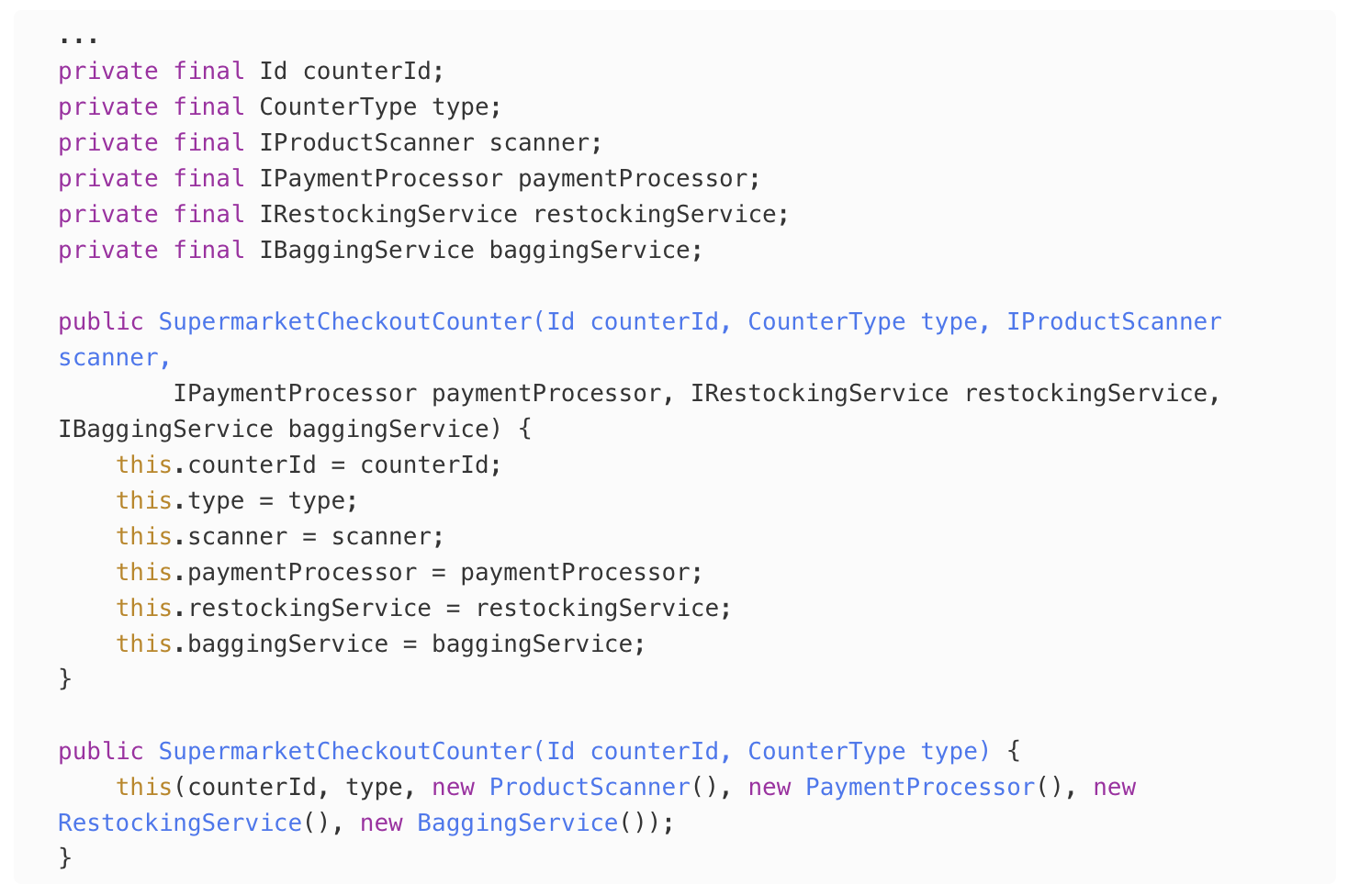
Avoid the new keyword throughout our code by injecting a fake version through a new constructor that takes all dependencies.
2. To avoid breaking any code, we leave our existing constructor intact, and add a new one with all the things we want to inject:
3. Update the call using new to now use our instance variables, for example, in the scanner we completely remove the line where we were creating a new instance:
This strategy is called Dependency Injection, or Inversion of Control around some circles. Dependency Injection is a pretty broad topic, and I can’t go into all of it just in this article, or it would end up being an entire book.
For now, the only thing you need to know is that the new keyword is a potential for pain during tests, but also can potentially be painful to refactor even when not unit testing. Remember that we are not making the code testable just for the sake of tests, one of the reasons we are doing all of this is because it also makes our code better in general. If our code is testable it also means it is modular, which makes it malleable and open to future changes.
At this point our code is able to receive its dependencies from our tests. But the question is, what to inject?
We could create “mock” objects, either by creating them by using Salesforce built-in mock tools or using a library like fflib_mock . But I don’t want to do that. Instead, I will do it by hand, because I love you and I want to show you that it not that bad!
There is only one thing that is painful about this whole thing to me, and that is that to be able to pull all of this off, we should ideally depend on interfaces (or virtual classes that we can extend), and not concrete objects (note that this is not a problem when using mocking since we can mock concrete classes).
I won’t bore you with steps to create interfaces, so I’ll just go ahead and refactor my code a bit to use interfaces instead of classes. My constructor code now looks as follows:
Long story short I now have an interface for the different classes I depend on, but the real classes are still in there for my production code that was already working in my leaner constructor.
I don’t know about you, but I need a dopamine hit, so let’s run that one test we have and make sure we haven’t broken anything.
Oh yeah, that’s the stuff.
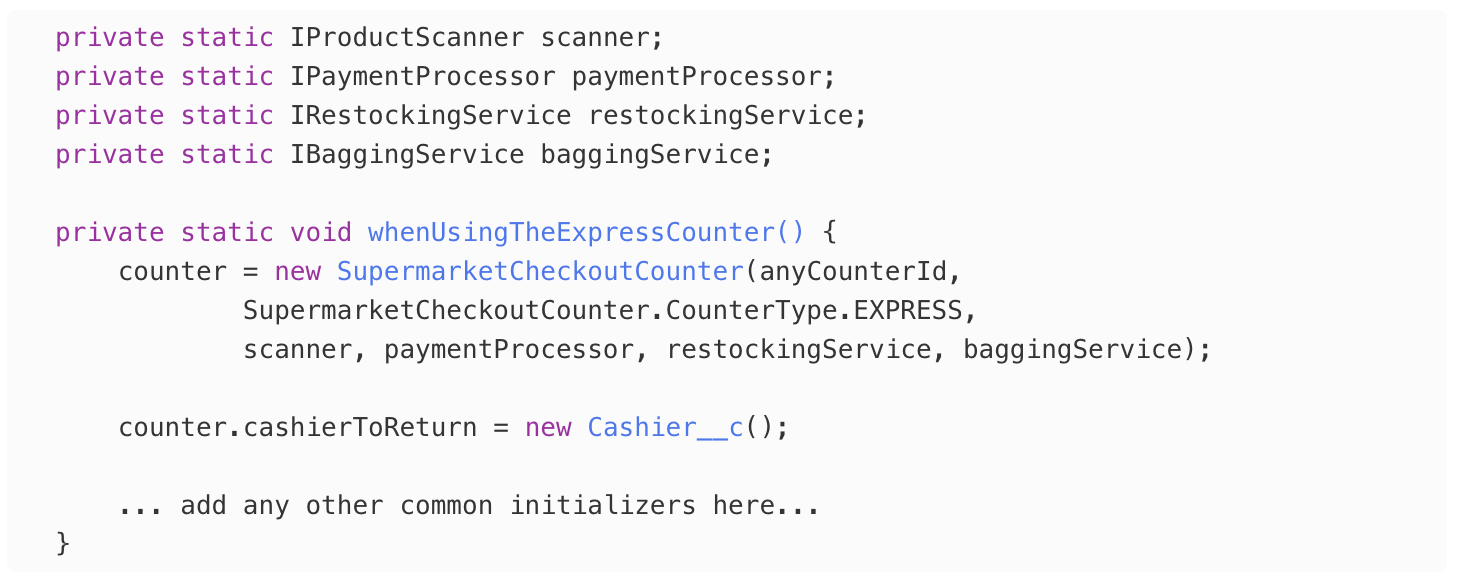
Let’s go back and make some updates to our tests. Now that we have a constructor that can receive injections, we want to make sure to use it:
There’s something I want to point out: The constructor for the class we are testing changed (technically it didn’t change, but in our tests we want to use the new one). Usually when that kind of thing happens (constructor change, method signature change) that makes all of our tests break and that is not fun. But here, because we have the setup code in a helper method, only one place needs to be updated. Fun!
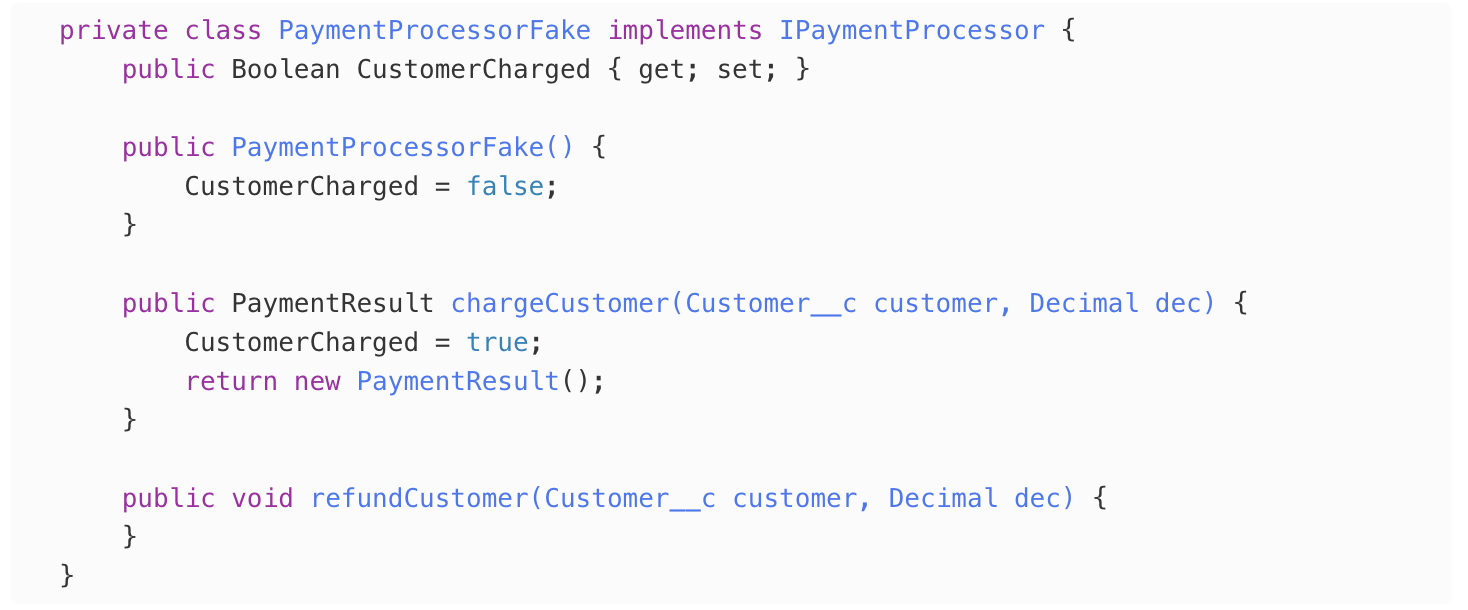
Now, let’s write fakes. You might think this will not be fun, but it will be fun, because Tip #9 is: Master your tools.
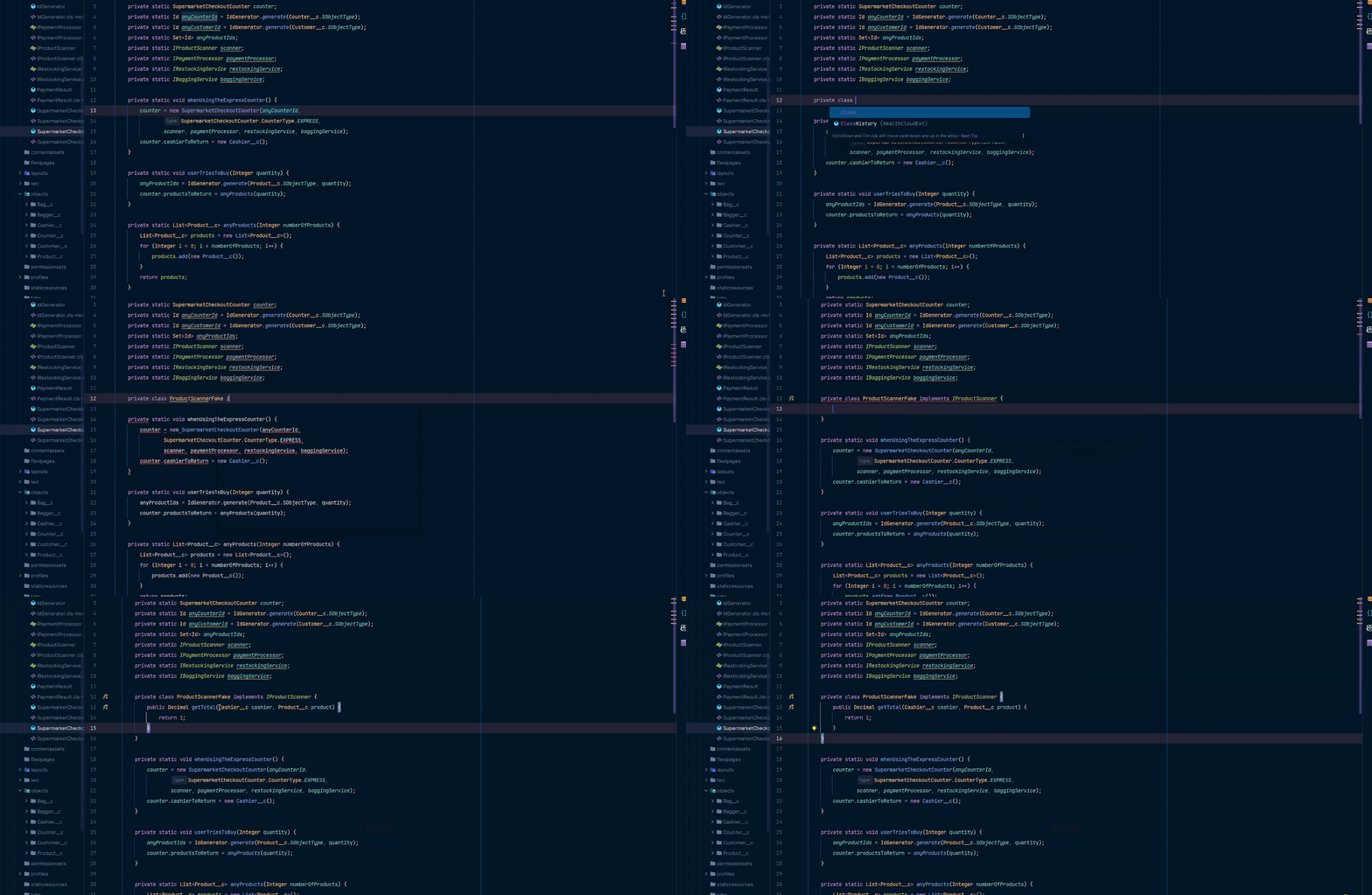
I will let my IDE to do the painful work for me:
Here you see me creating a fake for the IProductScanner. I create a new “fake” class, implement the corresponding interface and then just let the IDE autocomplete all of the implementations of the interface for me. 10 seconds max. FUN!
Since we are testing the Payment Processor flow, I’ll do something a little bit different in there. In our fake I’ll add a Boolean flag that will tell us if that code got invoked or not, checkiout:
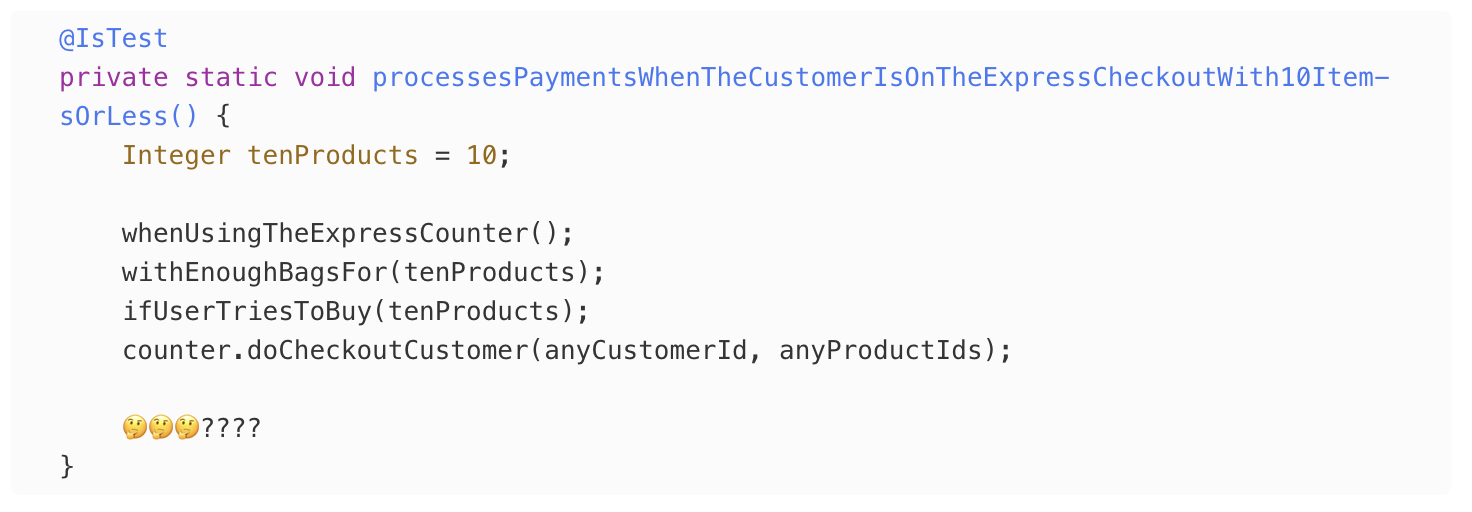
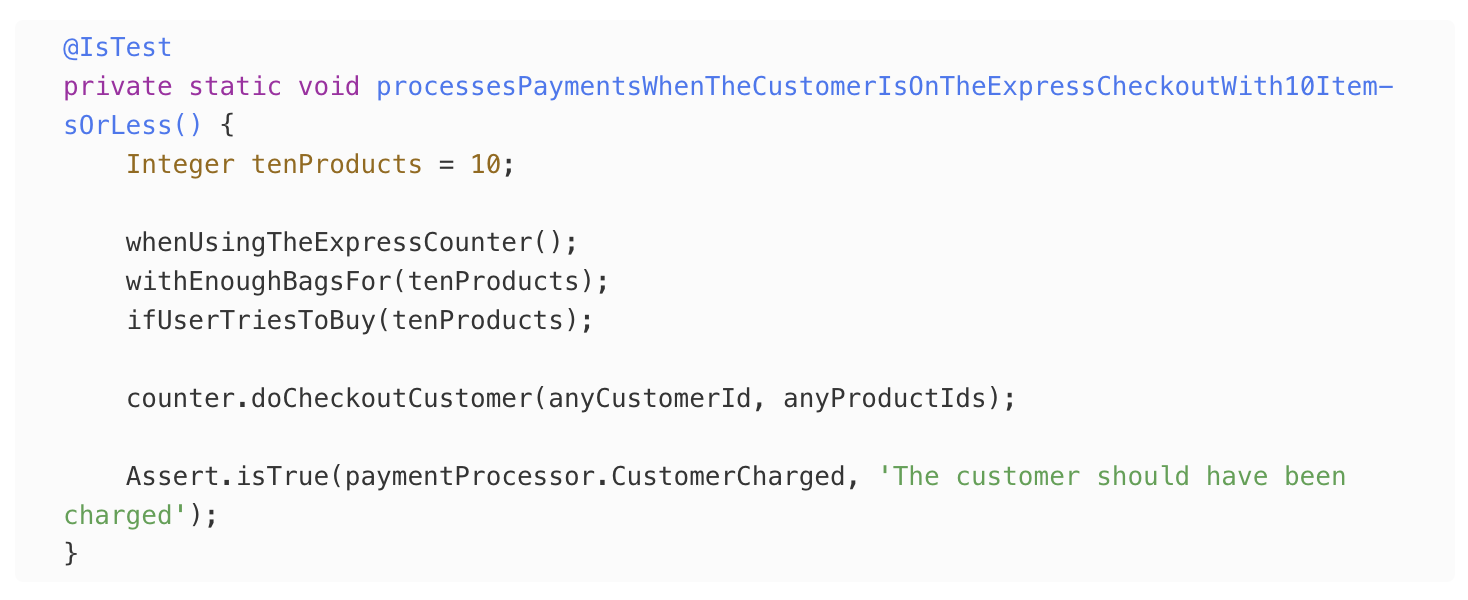
And with that in place, the final version of my test looks as follows:
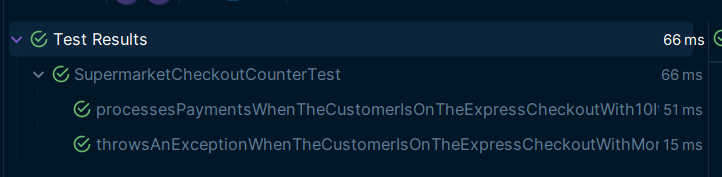
That’s beautiful if I say so myself. And let’s run it to get that dopamine hit:
Oh yes.
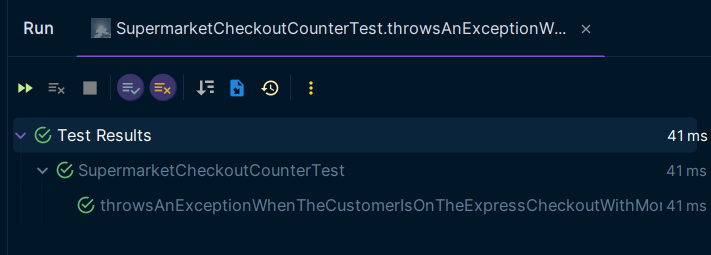
Notice something about these tests in the top right corner. 66ms. That is 66 thousandths of a second. That’s Tip #10: Keep your tests fast.
Slow tests are no fun. Keep your tests fast by avoiding things that are slow, like calling the database. The fun thing is that, as we discussed previously, setting up database data is tedious and no fun, so by NOT doing that, you also get the added benefit of fasts test. 2 for the price of 1 combo deal.
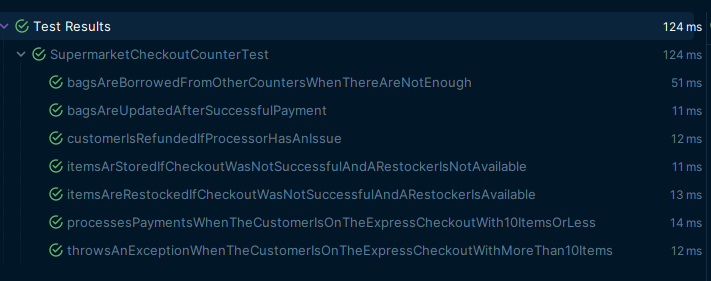
At this point, to be honest, I’m not even going to keep going. Writing the rest of the tests is simply going through the same stuff over and over again: keep going through the happy path assertions, modify your test setup fakes to cover negative scenarios, once you are done with the indentation level, go to the next one (the last one is red), and you are done.
That’s full coverage of the system under test in only a little over 1/10th of a second. I had fun.
Now, you’ll notice that because of our “hack” with moving SOQL queries around we are not really getting full coverage of the class itself. That’s because we are not really done, we need to fix that hack.
But fixing that hack is a refactoring exercise, and this post is just about testing, so I will not go much into that. What I will do is fast forward to what the end state of the code might look like post-refactoring.
But you know what’s fun? I can now refactor to my heart’s content. I have tests to back me up and warn me if I make I mistake. At this point, before refactoring, I would make sure to commit that code, and then refactor one thing at a time, making sure to run my tests after each refactoring, and if at any point I get a failure, I just go back to the previous state where my tests were all good.
Here’s a potential refactor:
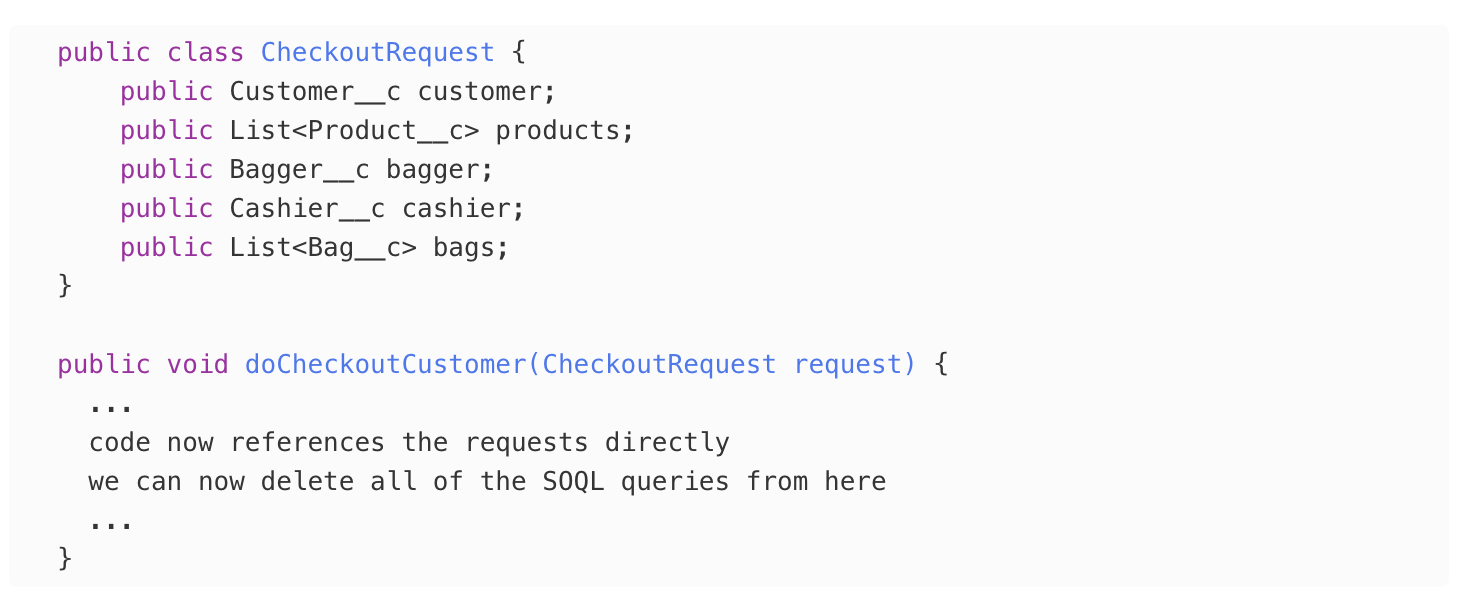
Instead of receiving the Ids, receive create a Request object for the service and receive the pre-queried SObject s directly as so:
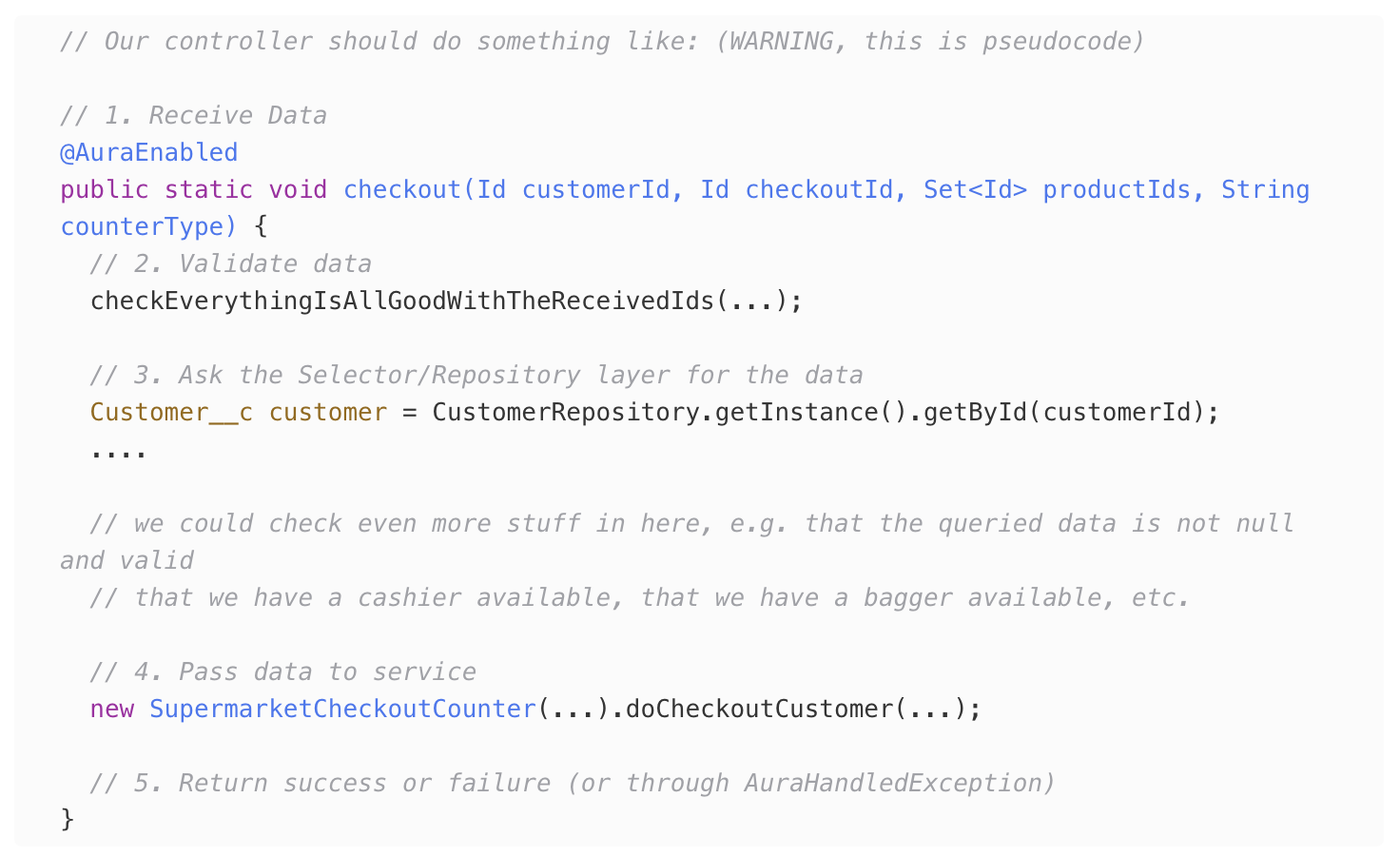
The reason this is cleaner and OK to do is because this class belongs to the “service” layer. This is not a class we want to call directly from the UI, instead we probably have a controller class that interacts with the UI, and then calls into this. At the service layer we can trust that the previous layers (in this example the controller layer is our “previous” layer) already conducted validation, queried the data, and made sure that we have enough information to execute the desired operation.
At the controller layer is where we want to essentially “orchestrate” our functionality. Our controller can then take care of calling the different pieces of our application that provides the intelligence to fulfill a user request:
Coding like this keeps everything nice and tidy. Each layer has its own responsibility (querying vs business logic vs UI vs validation) and gives us the added benefit of making everything testable.
What have we learned?
This is long, so I’ll just give you the tip(s) (giggity)
Do not refactor prematurely.
Don’t think too much.
Automate setup data.
Treat test code as production code.
Test (and assert) one thing at a time
Test UNITS
Trust that your dependencies are tested
Beware the new keyword
Master your tools
Keep your tests fast
If I could summarize this entire thing the entire thing in one tip, what I’d say is: If it gets boring, STOP.
Live Session Extravaganza Topics and Tips
Recap of Learnings and Tips
Concepts:
TDD
Design Pattern – Singleton
Design Pattern – Abstract Factory
Design Pattern – Builder (+ Fluent interface)
Getting over SObject creation restriction through JSON serialization
Design Pattern – Empty Object (Null Object)
Design Pattern – Visitor
Design Pattern – Iterable
Practices:
DO: Change the Salesforce directories/folders to your liking. The root directory can have whatever name you want and there are not many restrictions after that. Only a few metadata types have restrictions around how to name their parent folder (for example, any LWC must be under an lwc directory, but it does not matter where or how many lwcdirectories you have). For more info around the structure and restriction see: https://developer.salesforce.com/docs/atlas.en-us.sfdx_dev.meta/sfdx_dev/sfdx_dev_source_file_format.htm
DO: Commit after any meaningful change. I suggest committing after writing any passing test (or after any of your manual tests pass) so that you can always have a way to revert back to a place where the system was working, in case something breaks.
DO: Use the package.json scripts section to automate any repetitive tasks and scripts. For example, create a script that automates a new environment creation as follows: creates a new scratch org, pushes the source code, assigns any necessary permission sets, and imports data.
DO: Write unit tests so that they check one use case at a time. Don’t be afraid to copy-paste the test setup code and have some repetition around it. This is fine in unit tests as long as everything continues to be short and readable.
DON’T. Overload methods using flags. Prefer distinct methods with descriptive names instead.
DO: Refactor early and constantly. Don’t let the solution get too complex before refactoring since that will be too much work, and you won’t want to do it for fear of breaking something or because of the excuse that “it already works”
Anti-Pattern: God Classes
A lot of us are familiar with design patterns, which are typical solutions to recurring problems we see in software. Just like there are patterns that emerge over time and can help you solve common problems, there are also anti-patterns which, on the other hand, usually need to some kind of negative consequence.
One of these anti-patterns is the God Class (aka God Object). These are classes or objects that are responsible for doing too much within the application. They depend on everything, are depended upon by everything or, worse, both.
We call them Gods, but don’t be fooled by their name, they are evil.
We call them Gods because they are all-powerful and can control everything. This might sound like a good thing, however, as the complexity of the program increases, these classes become harder to maintain, debug, and test, leading to code that is difficult to understand and modify.
One of the main reasons why God classes are an antipattern is that they violate SRP – Single Responsibility Principle – and remember, this is the 🐐 of the SOLID principles. The SRP states that a class should have only one reason to change, which (usually) equates to having one responsibility or functionality. If a class is responsible for too many things, it becomes challenging to modify or test its code, and it becomes a significant source of errors and bugs.
But why?
Why is this bad? I can just tell you that they violate some principle or other and you can just believe me that that’s a bad thing, but it’s more important to understand the real consequences of the practice. Here are a few reasons:
Difficult to understand. God classes can be challenging to understand because they contain a lot of functionality in a single place. Developers may need to spend a considerable amount of time understanding how the class works, how its methods and properties interact with each other, and what it does in the overall context of the application.
This make them brittle. If a class is doing way too much, it also probably has a bunch of interdependent methods and fields (i.e. properties and variables). Making a small change to any part of this code cause have side-effects that the developer making the changing may not fully understand.
Hard to maintain. All of this make them hard to maintain. Because they are so big then there’s a lot of code that depend on them which, again, means that changes might have a lot of consequences. This makes them hard to reason about since you might need to know how all of its dependents are using it, and makes them scary to change, since no one wants to break something without realizing.
Increased coupling. Because they have so many responsibilities, other classes and components in the application may rely heavily on them, making it challenging to make changes without affecting other parts of the application.
Testing difficulties. All of its responsibilities make them difficult to test. Testing one part of the class may require setting up a complex state for the other parts of the class to function properly, making it time-consuming and error-prone.
So, what can you do about it?
The main thing is to keep an eye for classes that are growing out of control. If every time that you need to make a change to the system you find yourself editing the same class over and over, then that’s a sign that that class is violating SRP, because it has many reasons to change.
Additionally, keep an eye for a particular code-smell (yes, code has a smell, but only when it is stinky): the class name.
God classes usually have a very generic class name, which really attracts people to them and makes us want to add more and more things to them. It’s difficult to find a place where to put things, and we (developers) are too lazy to go through the struggles of creating yet another class just to put a small thing, so we tend to look for places that already exist where we can dump our new thing (maybe instead of God classes they should be called Dumpster Classes 🤔). Classes with a generic name give us the perfect excuse to put more things in them without feeling guilty by the fact that our code doesn’t belong there.
Keep an eye out for names containing:
Managers
Utils
Helper
Processor
Service
Now, if you see a class that contains one of those words in the name, it doesn’t necessarily mean its a bad thing. But…yeah, it usually is. There are definitely better names that we can come up with that really help define a single responsibility. Spend a little time thinking and come up with a better name.
Writing Clear Tests
Make Your Tests Complete and Concise
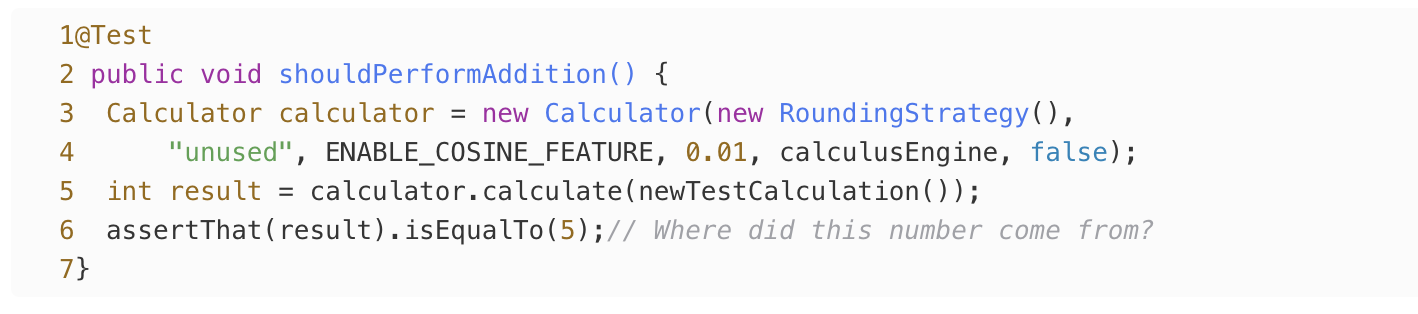
Two high-level properties that help tests achieve clarity are completeness and conciseness. A test is complete when its body contains all of the information a reader needs in order to understand how it arrives at its result. A test is concise when it contains no other distracting or irrelevant information. the following shows a test that is neither complete nor concise:
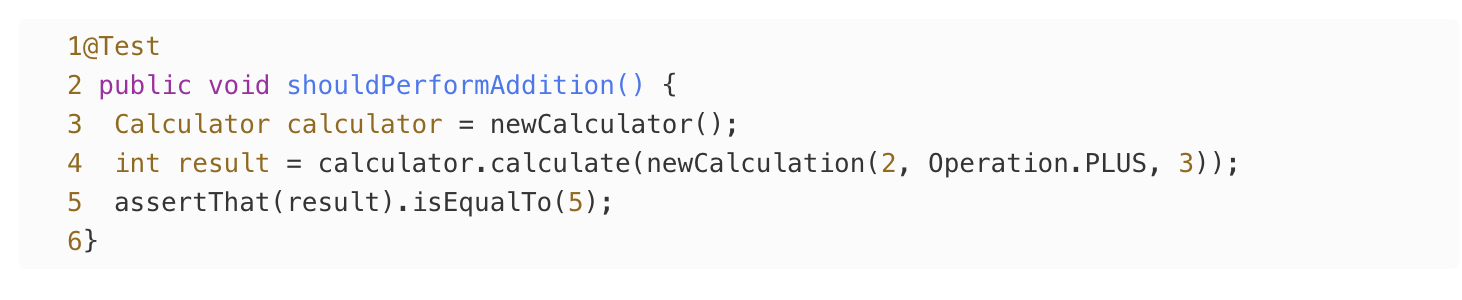
The test is passing a lot of irrelevant information into the constructor, and the actual important parts of the test are hidden inside of a helper method. The test can be made more complete by clarifying the inputs of the helper method, and more concise by using another helper to hide the irrelevant details of constructing the calculator:
Notice that no literally everything needs to be on the test method. Using helper methods is totally fine as long as we don’t lose the context of what is happening.
Not only that but helper methods also help hide the unnecessary complexity that is not needed for some particular tests.
Test Behaviors, Not Methods
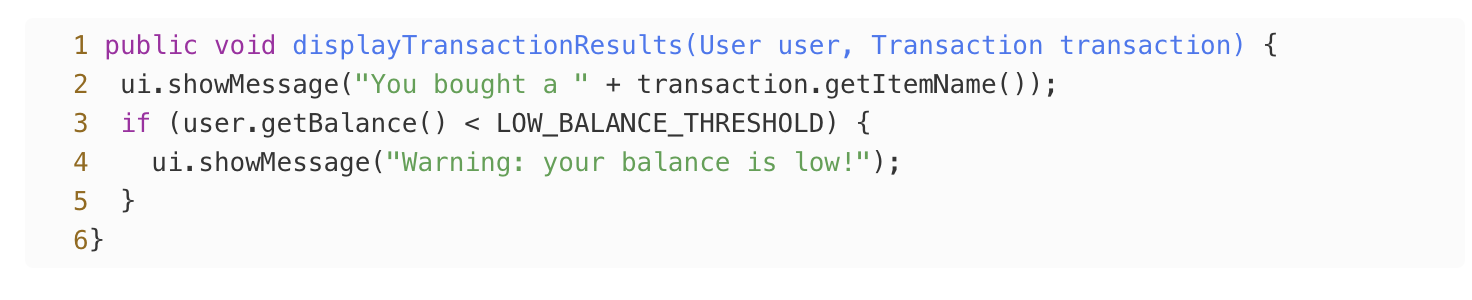
The first instinct of many engineers is to try to match the structure of their tests to the structure of their code such that every production method has a corresponding test method. This pattern can be convenient at first, but over time it leads to problems: as the method being tested grows more complex, its test also grows in complexity and becomes more difficult to reason about. For example, consider the following snippet of code, which displays the results of a transaction.
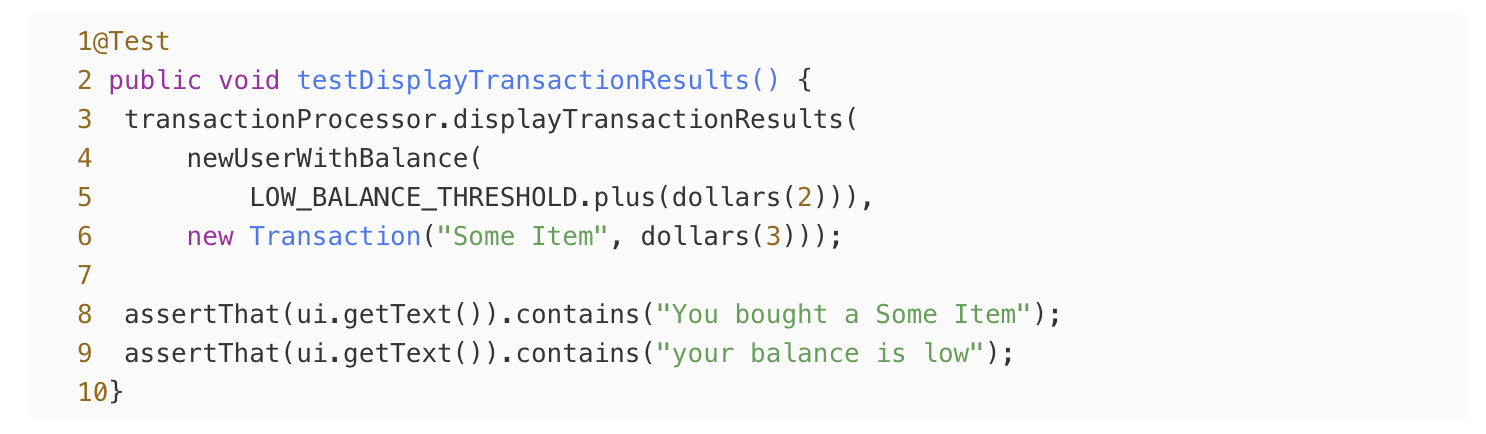
It wouldn’t be uncommon to find a test covering both of the messages that might be shown by the method, as presented here:
With such tests, it’s likely that the test started out covering only the first method. Later, an engineer expanded the test when the second message was added (violating the idea of unchanging tests that we discussed earlier). This modification sets a bad precedent: as the method under test becomes more complex and implements more functionality, its unit test will become increasingly convoluted and grow more and more difficult to work with.
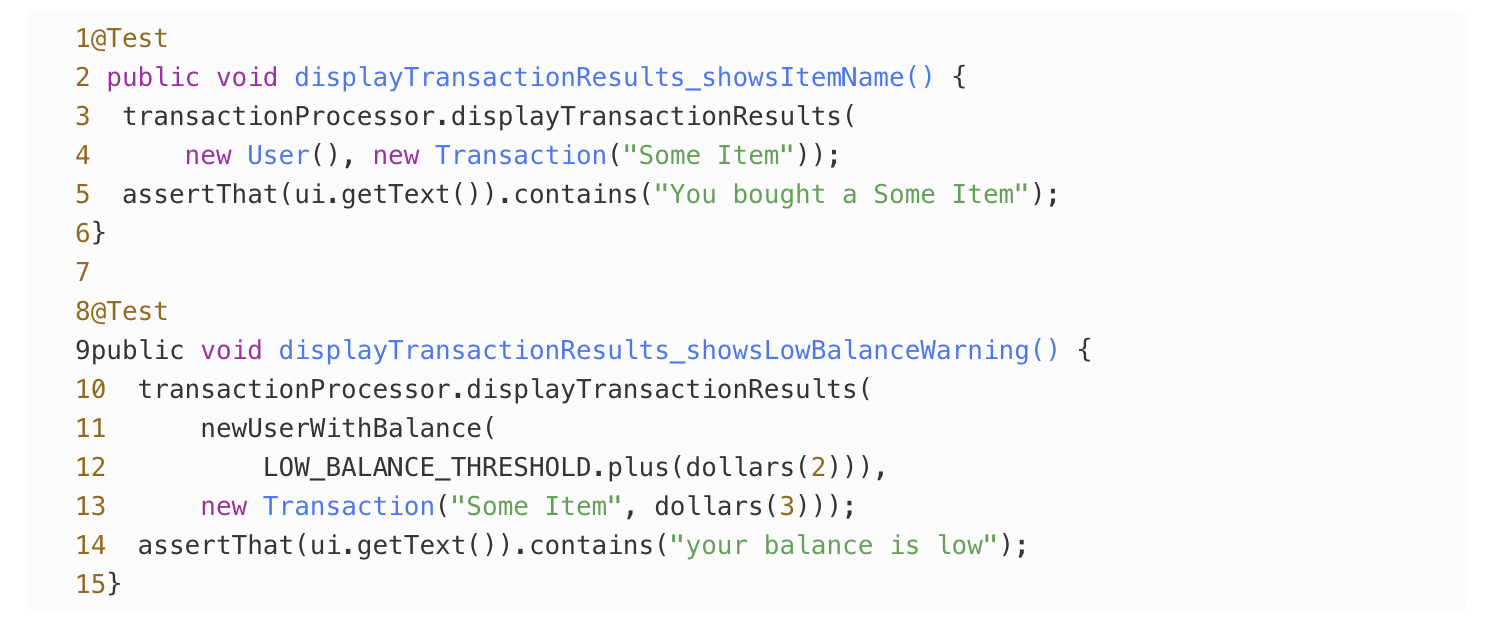
The problem is that framing tests around methods can naturally encourage unclear tests because a single method often does a few different things under the hood and might have several tricky edge and corner cases. There’s a better way: rather than writing a test for each method, write a test for each behavior. A behavior is any guarantee that a system makes about how it will respond to a series of inputs while in a particular state. Behaviors can often be expressed using the words “given,” “when,” and “then”. The previous example can be rewritten as follows:
Behavior-driven tests tend to be clearer than method-oriented tests for several reasons. First, they read more like natural language. Second, they more clearly express cause and effect because each test is more limited in scope. Finally, the fact that each test is short and descriptive makes it easier to see what functionality is already tested and encourages engineers to add new streamlined test methods instead of piling onto existing methods.
Don’t Put Logic in Tests
Clear tests are trivially correct upon inspection; that is, it is obvious that a test is doing the correct thing just from glancing at it. This is possible in test code because each test needs to handle only a particular set of inputs, whereas production code must be generalized to handle any input. For production code, we’re able to write tests that ensure complex logic is correct. But test code doesn’t have that luxury—if you feel like you need to write a test to verify your test, something has gone wrong!
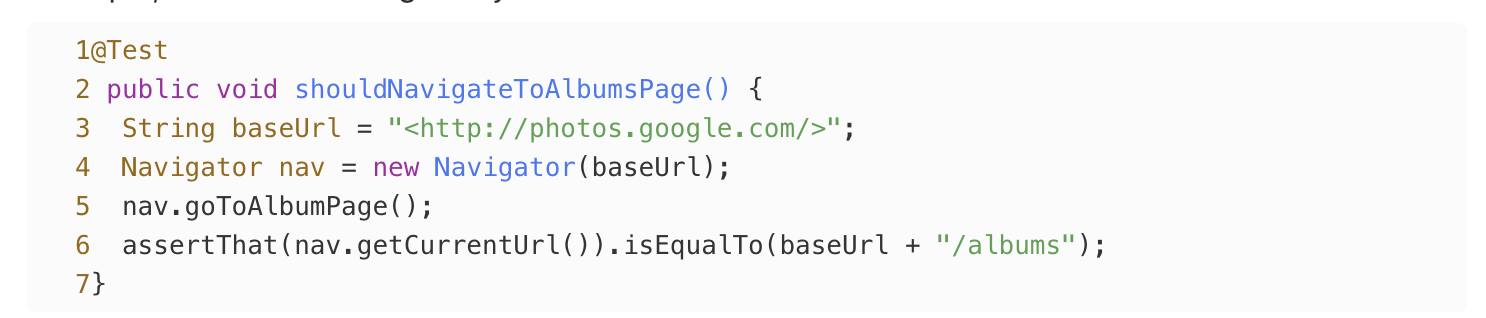
Complexity is most often introduced in the form of logic. Logic is defined via the imperative parts of programming languages such as operators, loops, and conditionals. When a piece of code contains logic, you need to do a bit of mental computation to determine its result instead of just reading it off of the screen. It doesn’t take much logic to make a test more difficult to reason about. For example, does this look right to you?
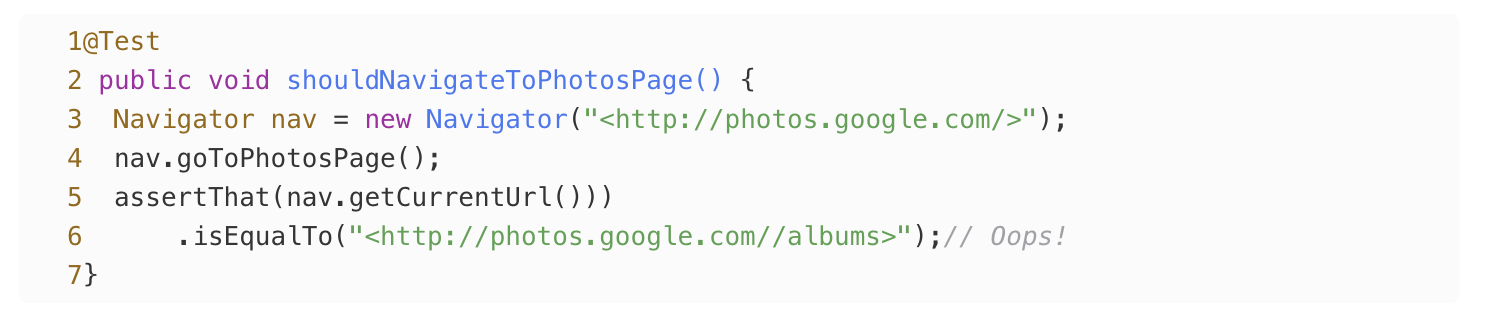
There’s not much logic here: really just one string concatenation. But if we simplify the test by removing that one bit of logic, a bug immediately becomes clear, as demonstrated here:
When the whole string is written out, we can see right away that we’re expecting two slashes in the URL instead of just one. If the production code made a similar mistake, this test would fail to detect a bug. Duplicating the base URL was a small price to pay for making the test more descriptive and meaningful.
If humans are bad at spotting bugs from string concatenation, we’re even worse at spotting bugs that come from more sophisticated programming constructs like loops and conditionals. The lesson is clear: in test code, stick to straight-line code over clever logic, and consider tolerating some duplication when it makes the test more descriptive and meaningful.